> ## Documentation Index
> Fetch the complete documentation index at: https://calcs.com/docs/llms.txt
> Use this file to discover all available pages before exploring further.
# How to Create an Organisation Shared Table
> Learn how to create, format, upload, and use an Organisation Shared Table in Calcs Builder.
## What Is a Shared Table?
An **Organisation Shared Table** is a reusable data table that you can reference from a **lookup widget** in Calcs Builder. It lets you store properties for a family of elements (e.g. bolts, sections, anchors) and then pull those properties into your calculations.
For example, the table below stores bolt properties such as:
* Diameter
* Minimum edge distance
* Nominal hole dimensions
* And more
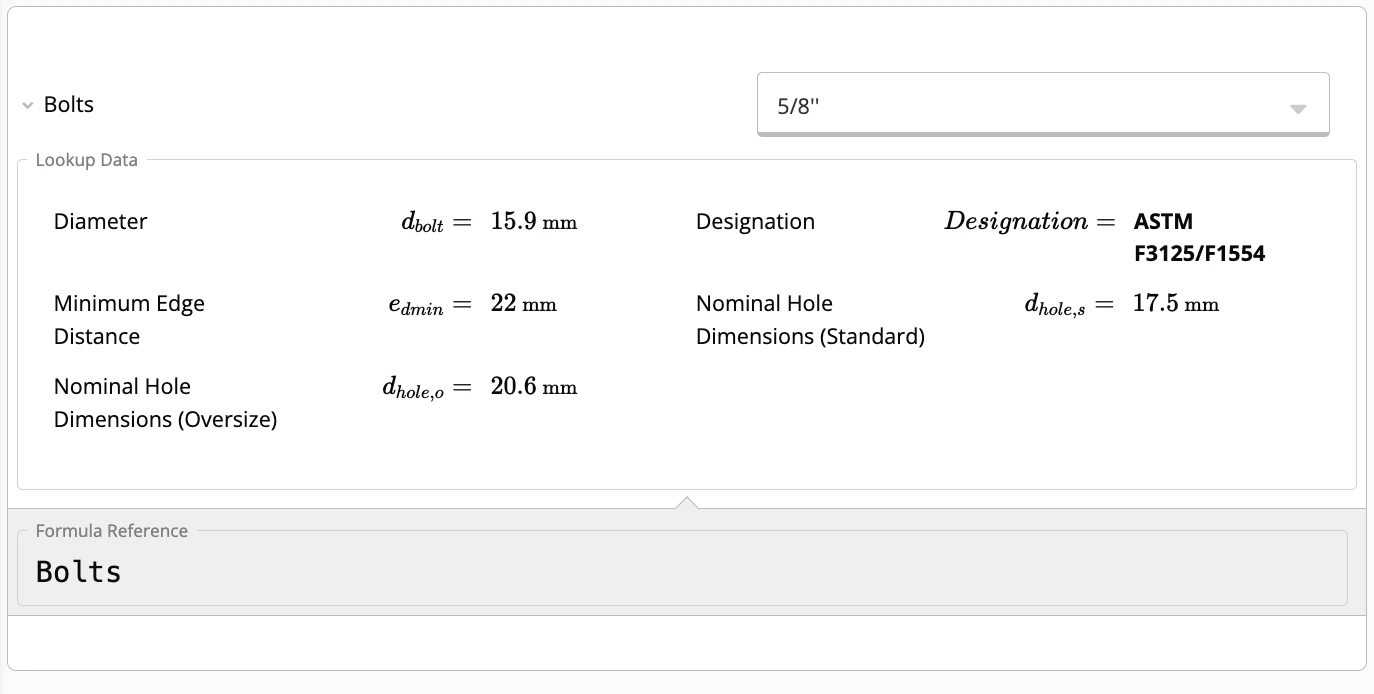 Once created, you can **upload the Excel file** as an Organisation Shared Table and use it across multiple templates.
***
## Step 1 – Build the Shared Table in Excel
Important: To work correctly in Calcs Builder, your Excel file must follow a specific structure.
### 1.1 Required Header Rows (A1–A4)
Your sheet must start with these rows:
| label |
| :---------- |
| symbol |
| units |
| referenceID |
| reference |
Each column under these rows represents a **property** in your shared table.
### 1.2 What Each Row Means
* **label**\
User-friendly name shown in the table, e.g. `Diameter`, `Nominal Dimension`, `Minimum Edge Distance`.
* **symbol**\
Symbol shown in the preview (LaTeX format).
* Example: for bolt diameter you might use `d_{bolt}`.
* **units**\
Unit for that property (e.g. `mm`, `kN`, `MPa`). Can be left blank if not applicable.
* **referenceID**\
Internal variable name used in equations and in the `L()` function.
* Usually similar to the symbol but **without LaTeX formatting**.
* Example: symbol `d_{bolt}` → referenceID `d_bolt`.
* **reference** (optional)\
Source of the data for that property.
* Example: `AISC 360-22`, `CSA`, or a specific handbook.
For more on symbols and reference IDs, see the [Calcs Builder Quick Start Guide](https://calcs.com/docs/calcs_builder/quick_start_guide).
***
## Step 2 – Example Header Setup
Here is an example for a bolt shared table:
| label | Nominal Dimension | Diameter | Designation | Minimum Edge Distance | Nominal Hole Dimensions (Standard) | Nominal Hole Dimensions (Oversize) |
| :---------- | :---------------- | :------- | :---------- | :-------------------- | :--------------------------------- | :--------------------------------- |
| symbol | d\_dim | d\_bolt | designation | e\_dmin | d\_hole\_s | d\_hole\_o |
| units | | mm | | mm | mm | mm |
| referenceID | d\_dim | d\_bolt | designation | e\_dmin | d\_hole\_s | d\_hole\_o |
| reference | | CSA | | CSA | CSA | CSA |
* Each **column** is one property.
* Each **row** defines how that property is displayed and used.
***
## Step 3 – Add Data Rows
Below the header rows, add the actual data:
| label | Nominal Dimension | Diameter | Designation | Minimum Edge Distance | Nominal Hole Dimensions (Standard) | Nominal Hole Dimensions (Oversize) |
| :---------- | :---------------- | :------- | :--------------- | :-------------------- | :--------------------------------- | :--------------------------------- |
| symbol | d\_dim | d\_bolt | designation | e\_dmin | d\_hole\_s | d\_hole\_o |
| units | | mm | | mm | mm | mm |
| referenceID | d\_dim | d\_bolt | designation | e\_dmin | d\_hole\_s | d\_hole\_o |
| reference | | CSA | | CSA | CSA | CSA |
| | 5/8'' | 15.875 | ASTM F3125/F1554 | 22 | 17.4625 | 20.6375 |
| | 3/4'' | 19.05 | ASTM F3125/F1554 | 25 | 20.6375 | 23.8125 |
| | 7/8'' | 22.225 | ASTM F3125/F1554 | 28 | 23.8125 | 26.9875 |
| | 1'' | 25.4 | ASTM F3125/F1554 | 32 | 28.575 | 31.75 |
| | 1-1/8'' | 28.575 | ASTM F3125/F1554 | 38 | 31.75 | 36.5125 |
| | M16 | 16 | ASTM F3125/F1554 | 22 | 18 | 20 |
| | M20 | 20 | ASTM F3125/F1554 | 26 | 22 | 24 |
| | M22 | 22 | ASTM F3125/F1554 | 28 | 24 | 28 |
| | M24 | 24 | ASTM F3125/F1554 | 30 | 27 | 30 |
| | M27 | 27 | ASTM F3125/F1554 | 34 | 30 | 35 |
The first four rows define the structure. All rows below them are data entries.
When finished, **save the file without spaces**, e.g.:
* `steelBoltsCA.xlsx` ✅
* `steel bolts CA.xlsx` ❌
***
## Step 4 – Upload the Shared Table to Calcs Builder
1. **Create or open a lookup widget**
Once created, you can **upload the Excel file** as an Organisation Shared Table and use it across multiple templates.
***
## Step 1 – Build the Shared Table in Excel
Important: To work correctly in Calcs Builder, your Excel file must follow a specific structure.
### 1.1 Required Header Rows (A1–A4)
Your sheet must start with these rows:
| label |
| :---------- |
| symbol |
| units |
| referenceID |
| reference |
Each column under these rows represents a **property** in your shared table.
### 1.2 What Each Row Means
* **label**\
User-friendly name shown in the table, e.g. `Diameter`, `Nominal Dimension`, `Minimum Edge Distance`.
* **symbol**\
Symbol shown in the preview (LaTeX format).
* Example: for bolt diameter you might use `d_{bolt}`.
* **units**\
Unit for that property (e.g. `mm`, `kN`, `MPa`). Can be left blank if not applicable.
* **referenceID**\
Internal variable name used in equations and in the `L()` function.
* Usually similar to the symbol but **without LaTeX formatting**.
* Example: symbol `d_{bolt}` → referenceID `d_bolt`.
* **reference** (optional)\
Source of the data for that property.
* Example: `AISC 360-22`, `CSA`, or a specific handbook.
For more on symbols and reference IDs, see the [Calcs Builder Quick Start Guide](https://calcs.com/docs/calcs_builder/quick_start_guide).
***
## Step 2 – Example Header Setup
Here is an example for a bolt shared table:
| label | Nominal Dimension | Diameter | Designation | Minimum Edge Distance | Nominal Hole Dimensions (Standard) | Nominal Hole Dimensions (Oversize) |
| :---------- | :---------------- | :------- | :---------- | :-------------------- | :--------------------------------- | :--------------------------------- |
| symbol | d\_dim | d\_bolt | designation | e\_dmin | d\_hole\_s | d\_hole\_o |
| units | | mm | | mm | mm | mm |
| referenceID | d\_dim | d\_bolt | designation | e\_dmin | d\_hole\_s | d\_hole\_o |
| reference | | CSA | | CSA | CSA | CSA |
* Each **column** is one property.
* Each **row** defines how that property is displayed and used.
***
## Step 3 – Add Data Rows
Below the header rows, add the actual data:
| label | Nominal Dimension | Diameter | Designation | Minimum Edge Distance | Nominal Hole Dimensions (Standard) | Nominal Hole Dimensions (Oversize) |
| :---------- | :---------------- | :------- | :--------------- | :-------------------- | :--------------------------------- | :--------------------------------- |
| symbol | d\_dim | d\_bolt | designation | e\_dmin | d\_hole\_s | d\_hole\_o |
| units | | mm | | mm | mm | mm |
| referenceID | d\_dim | d\_bolt | designation | e\_dmin | d\_hole\_s | d\_hole\_o |
| reference | | CSA | | CSA | CSA | CSA |
| | 5/8'' | 15.875 | ASTM F3125/F1554 | 22 | 17.4625 | 20.6375 |
| | 3/4'' | 19.05 | ASTM F3125/F1554 | 25 | 20.6375 | 23.8125 |
| | 7/8'' | 22.225 | ASTM F3125/F1554 | 28 | 23.8125 | 26.9875 |
| | 1'' | 25.4 | ASTM F3125/F1554 | 32 | 28.575 | 31.75 |
| | 1-1/8'' | 28.575 | ASTM F3125/F1554 | 38 | 31.75 | 36.5125 |
| | M16 | 16 | ASTM F3125/F1554 | 22 | 18 | 20 |
| | M20 | 20 | ASTM F3125/F1554 | 26 | 22 | 24 |
| | M22 | 22 | ASTM F3125/F1554 | 28 | 24 | 28 |
| | M24 | 24 | ASTM F3125/F1554 | 30 | 27 | 30 |
| | M27 | 27 | ASTM F3125/F1554 | 34 | 30 | 35 |
The first four rows define the structure. All rows below them are data entries.
When finished, **save the file without spaces**, e.g.:
* `steelBoltsCA.xlsx` ✅
* `steel bolts CA.xlsx` ❌
***
## Step 4 – Upload the Shared Table to Calcs Builder
1. **Create or open a lookup widget**
 2. **Select "Organisation Shared Table"**
3. **Click “Upload a shared table”** and choose your Excel file.
4. **Confirm it appears in the list**
2. **Select "Organisation Shared Table"**
3. **Click “Upload a shared table”** and choose your Excel file.
4. **Confirm it appears in the list**
 That’s it, your shared table is now available in your calculator.
***
## Step 5 – Using `L()` to Extract Values
To use values from your shared table inside equations, call the `L()` function.
### 5.1 Function Format
```text theme={null}
L("lookup_reference_id", "property_reference_id")
```
### 5.2 Example
If your lookup has:
* Lookup referenceId: `Bolts`
* Property referenceID: `d_dim`
Use:
```text theme={null}
L("Bolts", "d_dim")
```
This returns the **Nominal Dimension** for the selected bolt.
## Download Example File
If you want to test everything above, you can download the example file here:
👉 **[steelBoltsCA.xlsx (Google Sheets Link)](https://docs.google.com/spreadsheets/d/1ogolSFb0FB-0UAbs6K9qIQwNGkB5-aaE/edit?gid=1202602056#gid=1202602056)**
You can download it as `.xlsx` and upload it into your Organisation Shared Tables to try the workflow yourself.
That’s it, your shared table is now available in your calculator.
***
## Step 5 – Using `L()` to Extract Values
To use values from your shared table inside equations, call the `L()` function.
### 5.1 Function Format
```text theme={null}
L("lookup_reference_id", "property_reference_id")
```
### 5.2 Example
If your lookup has:
* Lookup referenceId: `Bolts`
* Property referenceID: `d_dim`
Use:
```text theme={null}
L("Bolts", "d_dim")
```
This returns the **Nominal Dimension** for the selected bolt.
## Download Example File
If you want to test everything above, you can download the example file here:
👉 **[steelBoltsCA.xlsx (Google Sheets Link)](https://docs.google.com/spreadsheets/d/1ogolSFb0FB-0UAbs6K9qIQwNGkB5-aaE/edit?gid=1202602056#gid=1202602056)**
You can download it as `.xlsx` and upload it into your Organisation Shared Tables to try the workflow yourself.