> ## Documentation Index
> Fetch the complete documentation index at: https://calcs.com/docs/llms.txt
> Use this file to discover all available pages before exploring further.
# Tornado Loads (ASCE 7-22)
> Calculate tornado loads for components and cladding according to ASCE 7-22 Chapter 32.
The **Wind Load Calculator to ASCE 7-22** includes provisions for determining tornado loads as mandated by **Chapter 32** of the standard. This feature allows users to determine if tornado loads are required based on site conditions and Risk Category, and subsequently calculates the design pressures.
**MWFRS Limitation**
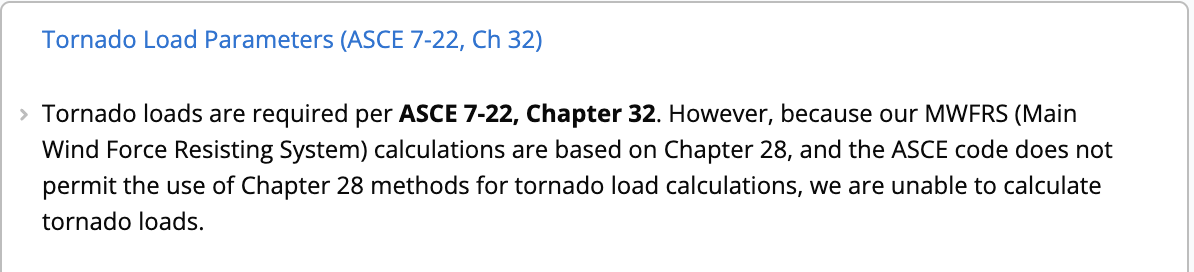
ASCE 7-22 prohibits using Chapter 28 (Envelope Procedure) for tornado loads. Consequently, this calculator supports tornado load analysis for **Components and Cladding (C\&C)** only.
## 1. Determining Applicability
ASCE 7-22 requires tornado load design primarily for **Risk Category III and IV** structures located in tornado-prone regions. The calculator automates the complex checks required to determine if these loads apply to your specific project.
The calculator automatically pulls these parameters from your **Project Defaults**. However, if you need to modify them for this specific calculation only, you can do so in the **Override Project Defaults** section.
Ensure the **Building Risk Category** is set to **III** or **IV**. Tornado loads are generally not required for Risk Category I or II structures.
Select **Yes** for "Tornado-Prone Region". You can verify this using ASCE 7-22 Figure 32.1-1 or by checking the [ASCE Hazard Tool](https://ascehazardtool.org/).
 Input the **Tornado Speed** ($V_T$). This is distinct from the Basic Wind Speed ($V$) and must be sourced specifically for tornado hazards.
 ## 2. Tornado Loads Required Check
Once the site parameters are input (either via Project Defaults or Overrides), the calculator performs the validation checks outlined in **ASCE 7-22, Cl 32.5.2**.
The calculator compares the Tornado Speed ($V_T$) against the Basic Wind Speed ($V$) and the Exposure Category to answer the **Tornado Loads Required** output.
* **No**: Standard wind loads govern, and no further tornado analysis is needed.
* **Yes**: You must proceed to calculate the specific tornado pressures.
## 3. Calculation Type Selection
To perform tornado loads, you must select **"Components and Cladding"** from the **"Type of Calculation"** dropdown.
If you select *MWFRS (Envelope Procedure)* while Tornado Loads are required, the calculator will display a note indicating that tornado loads cannot be calculated using the Chapter 28 Envelope Procedure.
## 2. Tornado Loads Required Check
Once the site parameters are input (either via Project Defaults or Overrides), the calculator performs the validation checks outlined in **ASCE 7-22, Cl 32.5.2**.
The calculator compares the Tornado Speed ($V_T$) against the Basic Wind Speed ($V$) and the Exposure Category to answer the **Tornado Loads Required** output.
* **No**: Standard wind loads govern, and no further tornado analysis is needed.
* **Yes**: You must proceed to calculate the specific tornado pressures.
## 3. Calculation Type Selection
To perform tornado loads, you must select **"Components and Cladding"** from the **"Type of Calculation"** dropdown.
If you select *MWFRS (Envelope Procedure)* while Tornado Loads are required, the calculator will display a note indicating that tornado loads cannot be calculated using the Chapter 28 Envelope Procedure.

 ## 4. Worked Example: Community School (Risk Category III)
In this example, we will determine the tornado C\&C pressures for a **Risk Category III** structure (e.g., a school with capacity > 250) located in **Moore, Oklahoma**.
### Procedure
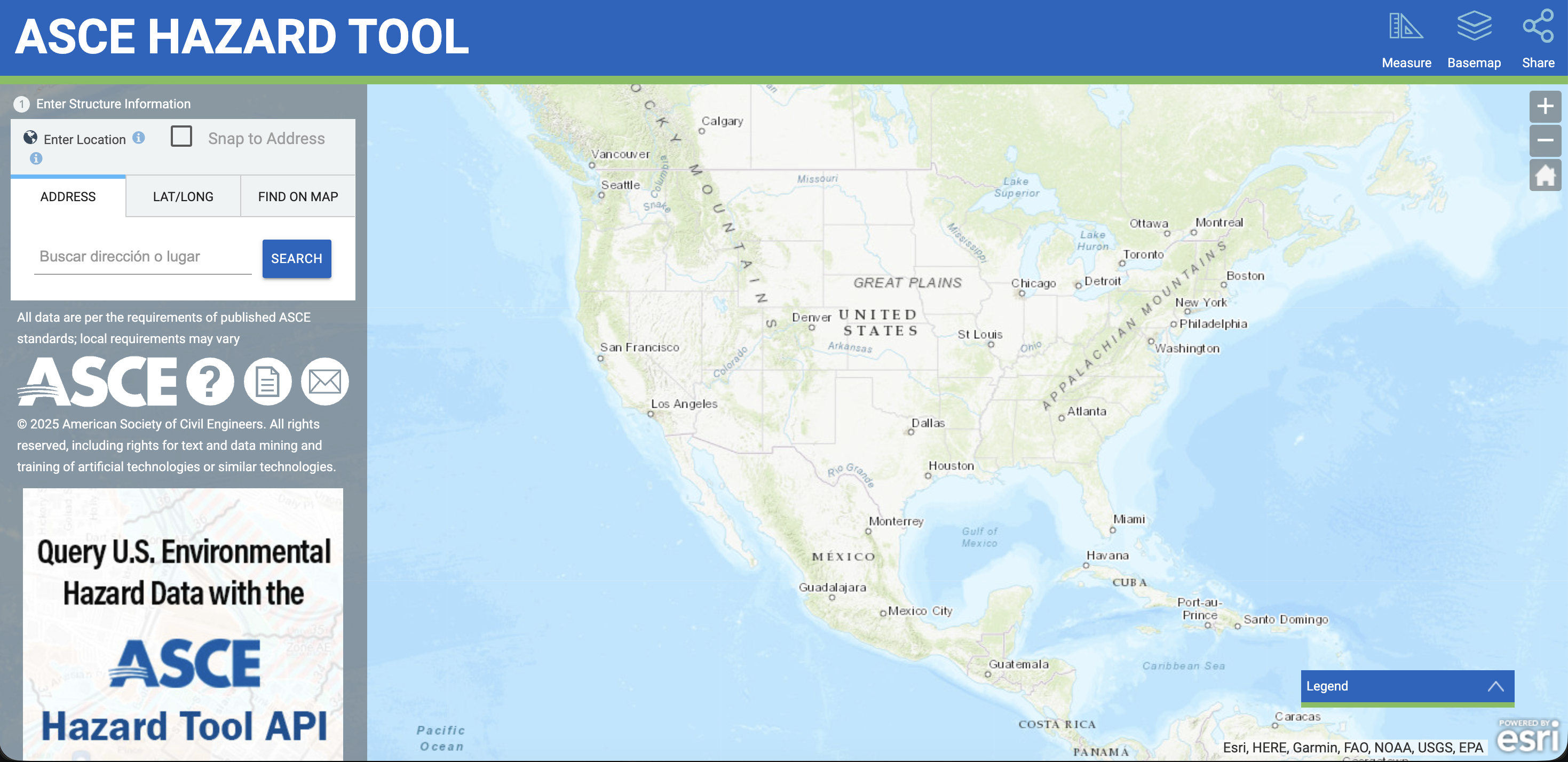
Navigate to the [ASCE Hazard Tool](https://ascehazardtool.org/) to retrieve the precise wind parameters.
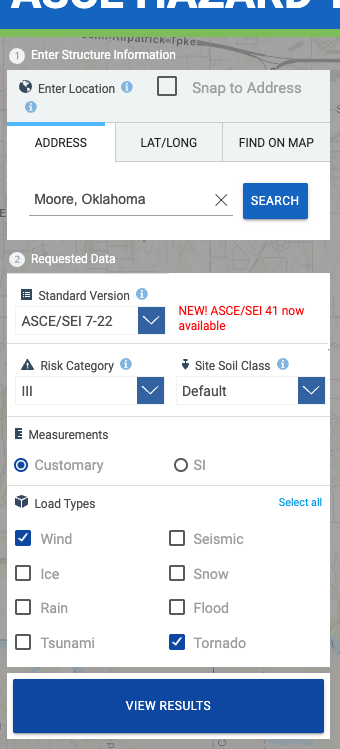
1. **Search by Location:** Enter "Moore, Oklahoma".
2. **Select Standard:** Choose **ASCE/SEI 7-22** from the "Standard Version" dropdown.
3. **Risk Category:** Select **III**.
4. **Select Load Types:** Under the "Load Types" menu, ensure both the **Wind** and **Tornado** checkboxes are selected.
## 4. Worked Example: Community School (Risk Category III)
In this example, we will determine the tornado C\&C pressures for a **Risk Category III** structure (e.g., a school with capacity > 250) located in **Moore, Oklahoma**.
### Procedure
Navigate to the [ASCE Hazard Tool](https://ascehazardtool.org/) to retrieve the precise wind parameters.
1. **Search by Location:** Enter "Moore, Oklahoma".
2. **Select Standard:** Choose **ASCE/SEI 7-22** from the "Standard Version" dropdown.
3. **Risk Category:** Select **III**.
4. **Select Load Types:** Under the "Load Types" menu, ensure both the **Wind** and **Tornado** checkboxes are selected.
 5. Click the **VIEW RESULTS** button.
6. **Review Location Results:** Note the **Basic Wind Speed ($V$)** is **115 mph**.
5. Click the **VIEW RESULTS** button.
6. **Review Location Results:** Note the **Basic Wind Speed ($V$)** is **115 mph**.
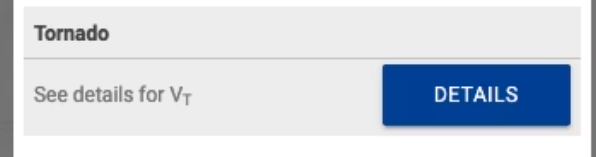 7. **Select Tornado Speed ($V_T$):** Click **Details** next to the Tornado section to view the table. Select the speed corresponding to your building's **Effective Plan Area** (footprint).
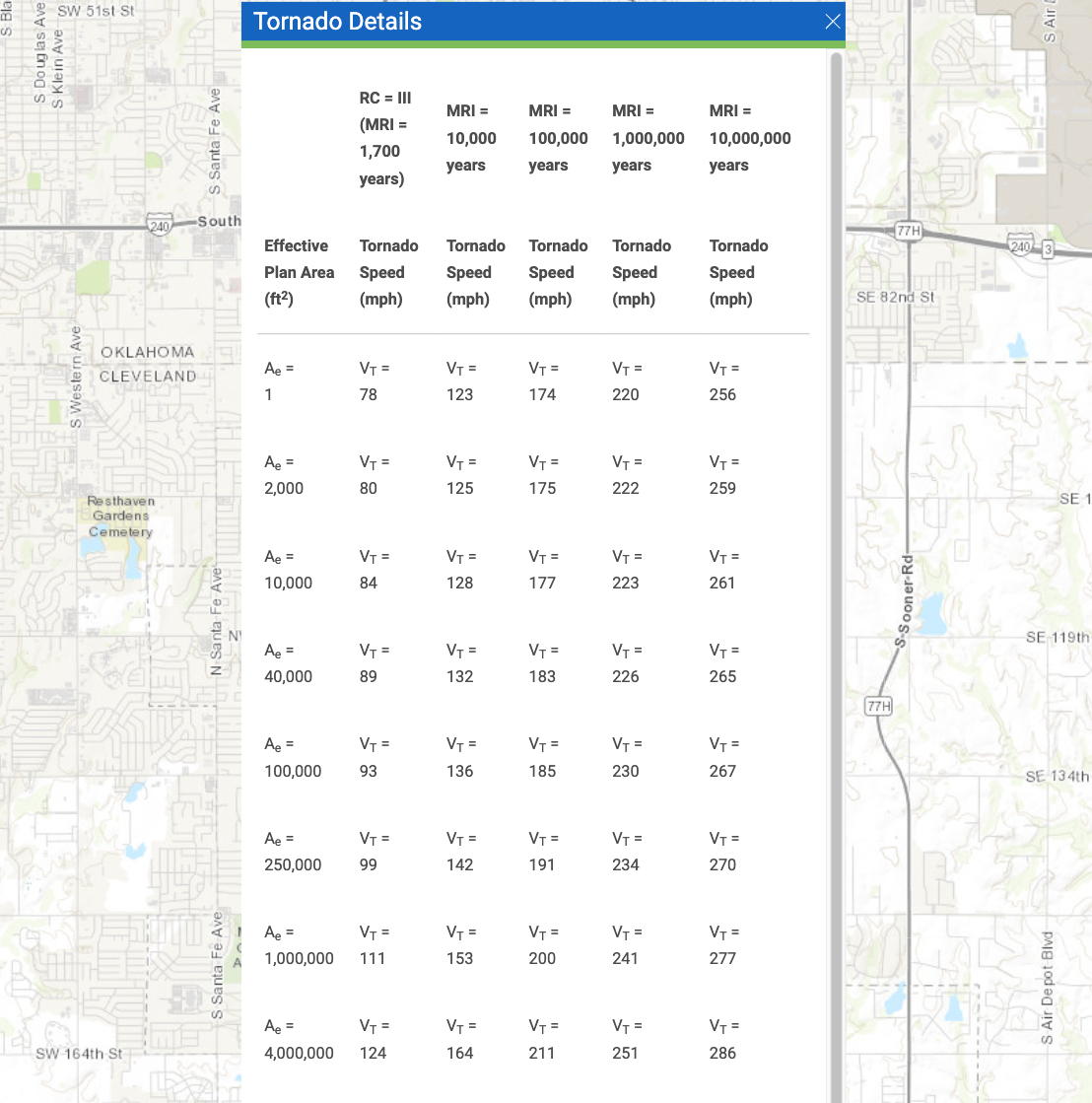 * *Example:* For a school with a **40,000 $ft^2$** footprint, the table indicates **$V_T$ = 89 mph**.
In **Calcs.com**, navigate to the **Project Defaults** tab on the sidebar to apply these environmental parameters globally.
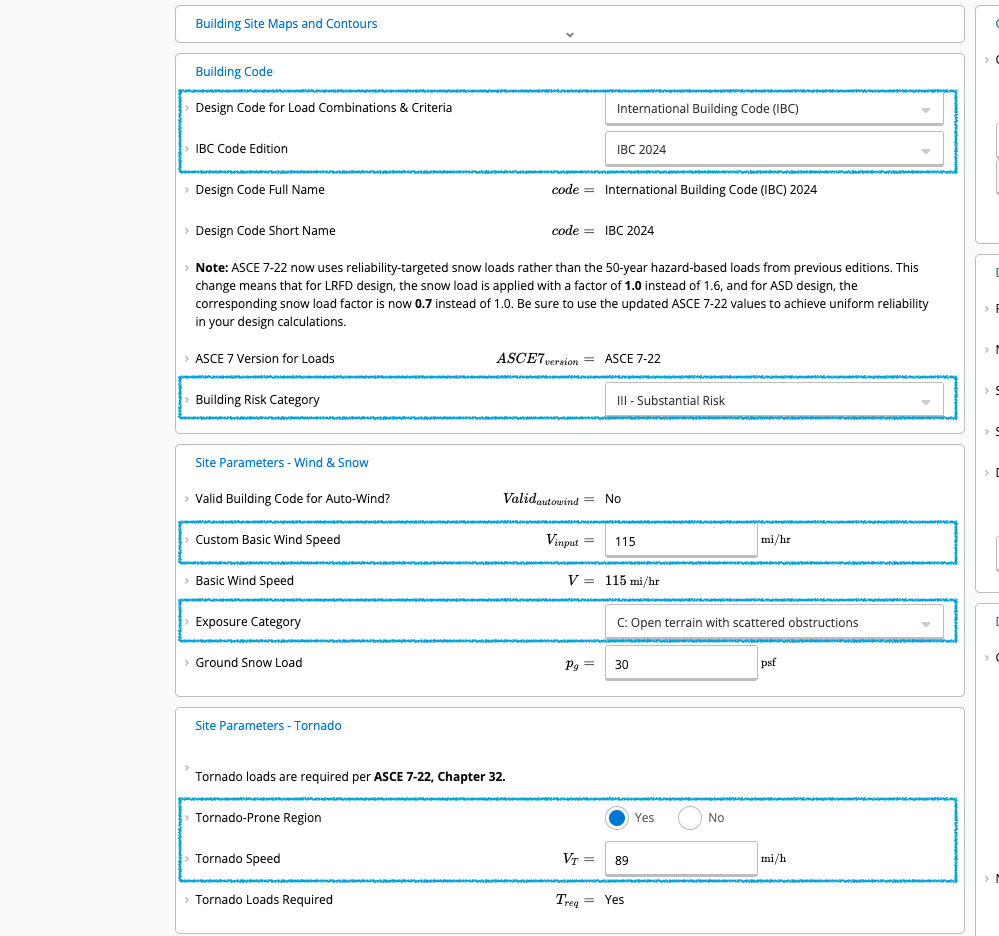
* **Code:** Select **International Building Code (IBC) 2024** (references ASCE 7-22).
* **Building Risk Category:** Select **III (Substantial Risk)**.
* **Exposure Category:** Select **C** (Standard for open terrain).
* **Basic Wind Speed ($V$):** Enter **115 mph**.
* **Tornado Speed ($V_T$):** Enter **89 mph** (Based on 40,000 $ft^2$ plan area).
* *Example:* For a school with a **40,000 $ft^2$** footprint, the table indicates **$V_T$ = 89 mph**.
In **Calcs.com**, navigate to the **Project Defaults** tab on the sidebar to apply these environmental parameters globally.
* **Code:** Select **International Building Code (IBC) 2024** (references ASCE 7-22).
* **Building Risk Category:** Select **III (Substantial Risk)**.
* **Exposure Category:** Select **C** (Standard for open terrain).
* **Basic Wind Speed ($V$):** Enter **115 mph**.
* **Tornado Speed ($V_T$):** Enter **89 mph** (Based on 40,000 $ft^2$ plan area).
 You can add the calculator instantly using the direct link or select it manually.
**Option A: Quick Start (Direct Link)**
**Instantly create a new Wind Load calculation by clicking here:**
[**Create Wind Load Calculator**](https://calcs.com/new/sheet/loadsWindCnCASCE7-22)
*(This link automatically opens a new project and sheet in Calcs.com.)*
**Option B: Manual Selection**
1. Click **Add New Calculation** in the sidebar.
2. Select **Wind Loads (ASCE 7-22)**.
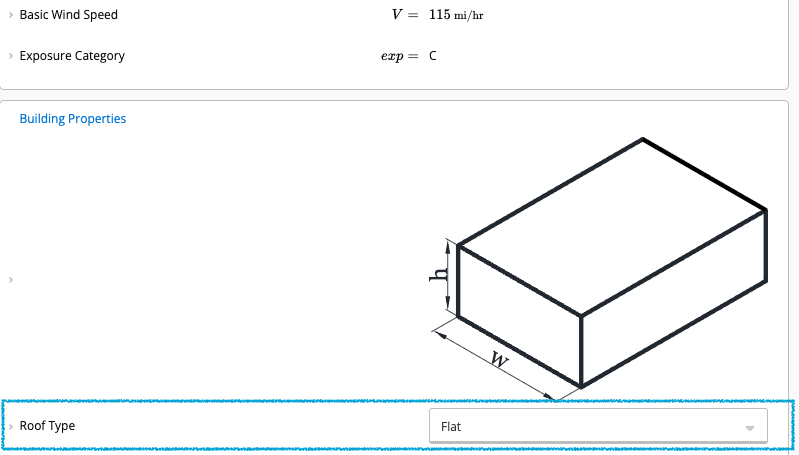
3. Once inside the calculator, locate the **Roof Type** dropdown and select **Flat**.
You can add the calculator instantly using the direct link or select it manually.
**Option A: Quick Start (Direct Link)**
**Instantly create a new Wind Load calculation by clicking here:**
[**Create Wind Load Calculator**](https://calcs.com/new/sheet/loadsWindCnCASCE7-22)
*(This link automatically opens a new project and sheet in Calcs.com.)*
**Option B: Manual Selection**
1. Click **Add New Calculation** in the sidebar.
2. Select **Wind Loads (ASCE 7-22)**.
3. Once inside the calculator, locate the **Roof Type** dropdown and select **Flat**.
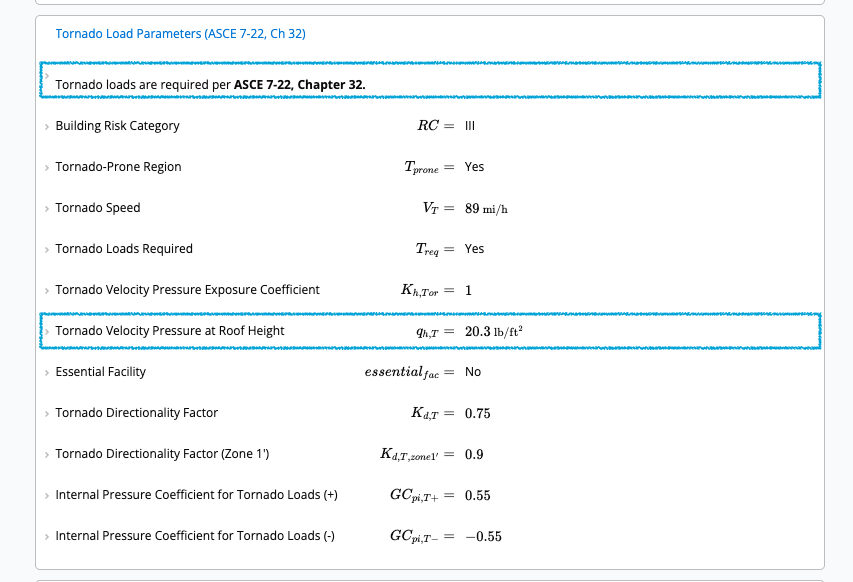
 Scroll down to the **Tornado Load Parameters (ASCE 7-22, Ch 32)** section within the calculator.
* The **Tornado Loads Required** field should read **"Yes"**.
* *Reasoning:* $V_T$ (89 mph) $\ge$ 60% of $V$ (which is 69 mph for 115 mph wind speed).
* The calculator determines the **Tornado Velocity Pressure** ($q_{h,T}$), accounting for the Tornado Pressure Exposure Coefficient ($K_{h,Tor}$).
Scroll down to the **Tornado Load Parameters (ASCE 7-22, Ch 32)** section within the calculator.
* The **Tornado Loads Required** field should read **"Yes"**.
* *Reasoning:* $V_T$ (89 mph) $\ge$ 60% of $V$ (which is 69 mph for 115 mph wind speed).
* The calculator determines the **Tornado Velocity Pressure** ($q_{h,T}$), accounting for the Tornado Pressure Exposure Coefficient ($K_{h,Tor}$).
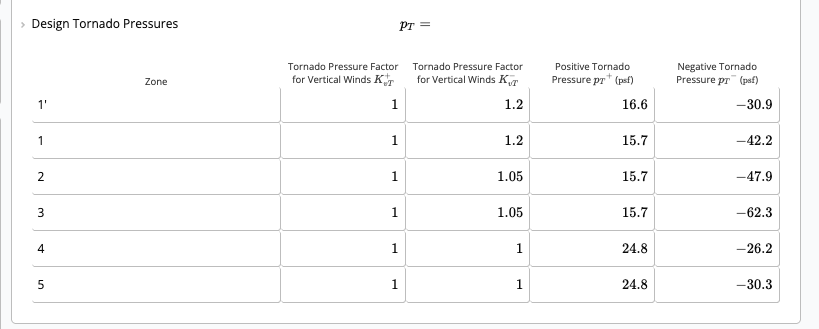
 Navigate to the **Summary** section on the right side of the calculator and look for the **Design Tornado Pressures** table.
The calculator automatically applies the specific **Directionality Factor** ($K_{d,T}$) and **Internal Pressure Coefficients** ($GC_{pi,T}$) required for tornado loading to output the final design values:
* **Tornado Pressure Factor for Vertical Winds** ($K_{vT}^+$ and $K_{vT}^-$)
* **Positive Tornado Pressure** ($p_T^+$) in psf
* **Negative Tornado Pressure** ($p_T^-$) in psf
Navigate to the **Summary** section on the right side of the calculator and look for the **Design Tornado Pressures** table.
The calculator automatically applies the specific **Directionality Factor** ($K_{d,T}$) and **Internal Pressure Coefficients** ($GC_{pi,T}$) required for tornado loading to output the final design values:
* **Tornado Pressure Factor for Vertical Winds** ($K_{vT}^+$ and $K_{vT}^-$)
* **Positive Tornado Pressure** ($p_T^+$) in psf
* **Negative Tornado Pressure** ($p_T^-$) in psf