> ## Documentation Index
> Fetch the complete documentation index at: https://calcs.com/docs/llms.txt
> Use this file to discover all available pages before exploring further.
# Wind Load Parapets (ASCE 7-16 and ASCE 7-22)
> How to model parapet wind pressures in the Calcs.com Wind Loads calculators for MWFRS and Components and Cladding.
Both [Wind Loads (ASCE 7-16)](/calculations/us/wind_loads__asce_7_16____mwfrs_overview) and [Wind Loads (ASCE 7-22)](/calculations/us/wind_loads_asce_7_22_components_and_cladding_overview) support optional parapet calculations for MWFRS and Components and Cladding (C\&C).
**Create a wind load sheet:**
* [Wind Loads (ASCE 7-16)](https://calcs.com/new/sheet/loadsWindCnCASCE7-16)
* [Wind Loads (ASCE 7-22)](https://calcs.com/new/sheet/loadsWindCnCASCE7-22)
## When parapet inputs appear
**Include Parapets?** is available when **Type of Calculation** is:
* **MWFRS (Envelope Procedure)**
* **MWFRS (Directional Procedure)**
* **Components and Cladding**, but only when **Individual Effective Area per Wind Zone** is set to **No**
If C\&C uses per-zone effective areas (**Individual Effective Area per Wind Zone** = **Yes**), parapet inputs are hidden.
## Inputs
In the **Parapets** section, set **Include Parapets?** to **Yes** (default is **No**).
* **Parapet Height Above Roof** ($h_{parapet}$): height from mean roof level to the top of the parapet. The calculator uses this elevation to evaluate velocity pressure at the top of the parapet.
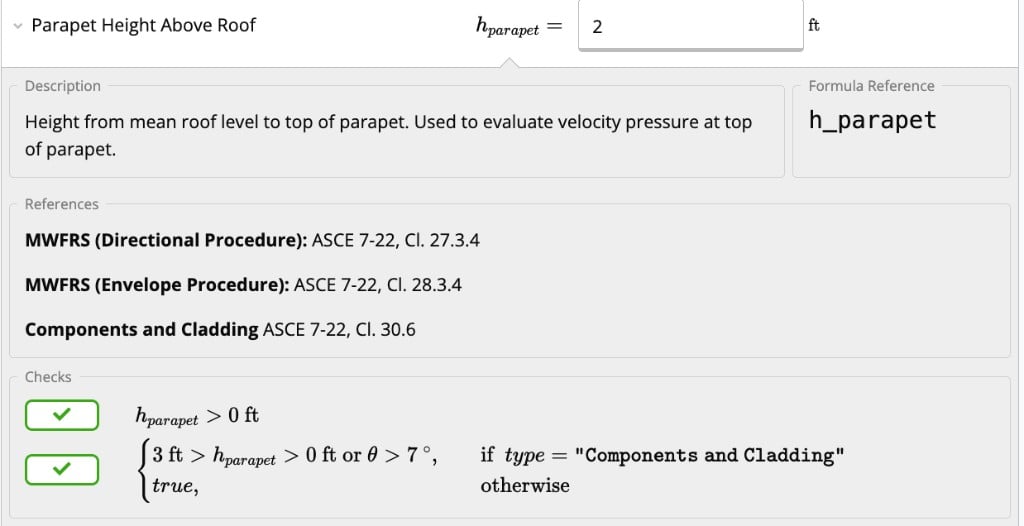 Detailed intermediate steps appear under **Parapets (ASCE 7-16, Cl. 27.3.4, Cl. 28.3.2, Cl. 30.6.1.2)** or **Parapets (ASCE 7-22, Cl. 27.3.4, Cl. 28.3.4, Cl. 30.6)**, depending on the calculator version.
## MWFRS parapet pressures
When parapets are enabled for MWFRS, the summary shows **Parapet Wind Pressures** with combined net pressures for windward and leeward faces.
| Face | Combined net pressure coefficient ($GC_{pn}$) |
| ---------------- | --------------------------------------------- |
| Windward parapet | +1.5 |
| Leeward parapet | −1.0 |
Code references:
* ASCE 7-16: Cl. 27.3.4 (Directional), Cl. 28.3.2 (Envelope)
* ASCE 7-22: Cl. 27.3.4 (Directional), Cl. 28.3.4 (Envelope)
Plus sign means net pressure toward the exterior; minus sign means suction away from the exterior.
## C\&C parapet pressures
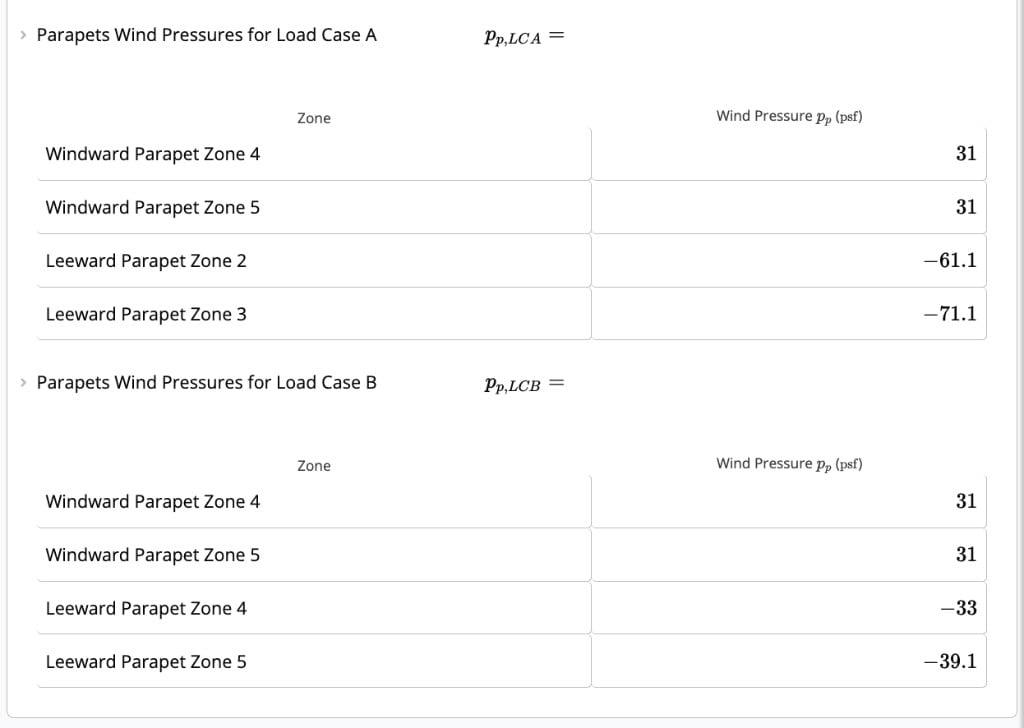
When parapets are enabled for C\&C (with **Individual Effective Area per Wind Zone** = **No**), the calculator outputs:
* **Parapets Wind Pressures for Load Case A**
* **Parapets Wind Pressures for Load Case B**
**Load Case A** reports:
* Windward parapet: Zones 4 and 5
* Leeward parapet: Zones 2 and 3
**Load Case B** reports:
* Windward parapet: Zones 4 and 5
* Leeward parapet: Zones 4 and 5
Detailed intermediate steps appear under **Parapets (ASCE 7-16, Cl. 27.3.4, Cl. 28.3.2, Cl. 30.6.1.2)** or **Parapets (ASCE 7-22, Cl. 27.3.4, Cl. 28.3.4, Cl. 30.6)**, depending on the calculator version.
## MWFRS parapet pressures
When parapets are enabled for MWFRS, the summary shows **Parapet Wind Pressures** with combined net pressures for windward and leeward faces.
| Face | Combined net pressure coefficient ($GC_{pn}$) |
| ---------------- | --------------------------------------------- |
| Windward parapet | +1.5 |
| Leeward parapet | −1.0 |
Code references:
* ASCE 7-16: Cl. 27.3.4 (Directional), Cl. 28.3.2 (Envelope)
* ASCE 7-22: Cl. 27.3.4 (Directional), Cl. 28.3.4 (Envelope)
Plus sign means net pressure toward the exterior; minus sign means suction away from the exterior.
## C\&C parapet pressures
When parapets are enabled for C\&C (with **Individual Effective Area per Wind Zone** = **No**), the calculator outputs:
* **Parapets Wind Pressures for Load Case A**
* **Parapets Wind Pressures for Load Case B**
**Load Case A** reports:
* Windward parapet: Zones 4 and 5
* Leeward parapet: Zones 2 and 3
**Load Case B** reports:
* Windward parapet: Zones 4 and 5
* Leeward parapet: Zones 4 and 5
 Code references:
* ASCE 7-16: Cl. 30.6.1.2
* ASCE 7-22: Cl. 30.6, Eq. 30.6-1
**C\&C parapet height limit**
For Components and Cladding, parapet height must be less than 3 ft when the roof angle is 7 degrees or less. If you exceed this limit, the calculator shows a message directing you to contact support.
## Related articles
* [Wind Loads (ASCE 7-16) - MWFRS Overview](/calculations/us/wind_loads__asce_7_16____mwfrs_overview)
* [Wind Loads - MWFRS Directional Procedure (ASCE 7-16 and ASCE 7-22)](/calculations/us/wind_loads_mwfrs_directional_asce_7)
* [Wind Loads (ASCE 7-22) - Components and Cladding Overview](/calculations/us/wind_loads_asce_7_22_components_and_cladding_overview)
* [Tornado Loads (ASCE 7-22)](/calculations/us/tornado_loads_asce7_22)
Code references:
* ASCE 7-16: Cl. 30.6.1.2
* ASCE 7-22: Cl. 30.6, Eq. 30.6-1
**C\&C parapet height limit**
For Components and Cladding, parapet height must be less than 3 ft when the roof angle is 7 degrees or less. If you exceed this limit, the calculator shows a message directing you to contact support.
## Related articles
* [Wind Loads (ASCE 7-16) - MWFRS Overview](/calculations/us/wind_loads__asce_7_16____mwfrs_overview)
* [Wind Loads - MWFRS Directional Procedure (ASCE 7-16 and ASCE 7-22)](/calculations/us/wind_loads_mwfrs_directional_asce_7)
* [Wind Loads (ASCE 7-22) - Components and Cladding Overview](/calculations/us/wind_loads_asce_7_22_components_and_cladding_overview)
* [Tornado Loads (ASCE 7-22)](/calculations/us/tornado_loads_asce7_22)