> ## Documentation Index
> Fetch the complete documentation index at: https://calcs.com/docs/llms.txt
> Use this file to discover all available pages before exploring further.
# Select Wood Connectors (ASD)
> Set up joist and supporting member properties in the Calcs.com Wood Connectors calculator, review load checks, and use load linking for hanger design.
The Wood Connectors Calculator provides a fast way to select the connector required for wood joists, including from the Simpson Strong-Tie catalog, and ensures the connector is strong enough to withstand provided loads.
**Instantly create a new Wood Connector calculation by clicking here:**
[**Create Wood Connector Calculator**](https://calcs.com/new/sheet/timberConnectorsASD)
*(This link automatically opens a new project and sheet in Calcs.com.)*
This article walks you through [Calcs.com](http://Calcs.com)’s Wood Connectors Calculator. You’ll learn how to set up joist and supporting member properties, select appropriate connectors, review load checks, and take advantage of the powerful load linking feature. Check out an in depth example video at the bottom of an article, and watch an overview of the calculator here:
The Wood Connectors Calculator allows you to quickly verify the compatibility and capacity of joist hangers. You can:
* Define joist size, grade, and loads manually
* Automatically link to an existing joist member in your project.
Results include connector compatibility checks, load capacity verification, required fasteners, and installed cost index comparisons.
## Method & scope
| Property | Detail |
| ---------------- | ----------------------------------------------------------------- |
| Design standards | Simpson Strong-Tie Wood Construction Connectors Catalog 2026-2027 |
| Regions | United States |
#### What it calculates
The Wood Connectors calculator selects and verifies Simpson Strong-Tie joist hangers against applied loads using Allowable Stress Design (ASD). Allowable loads are taken directly from the Simpson Strong-Tie Wood Construction Connectors Catalog 2026-2027 and are not independently computed.
##### Connector selection
Connectors are selected from the Simpson Strong-Tie database by joist type and supporting member species (DF, SP, SPF, or HF). Available mount types are Face Mount, Face Mount, (I-Joist, Glulam, SCL), and Top Flange. Each connector entry stores:
* **Nominal joist width** the connector is designed for
* **Connector width** (b\_conn) and **height/depth** (d\_conn)
* **Required fasteners** to the supporting header and to the joist (count, diameter, and length)
* **Allowable loads** for floor, snow, roof, and uplift loading by species group
##### Load duration factors and ASD load combinations
ASD load combinations follow ASCE 7 and NDS 2024. The governing factored demand is extracted for each duration class and compared against the corresponding catalog allowable:
| Load case | Duration factor (CD) |
| -------------------------- | -------------------- |
| Dead / storage | 0.9 |
| Floor live | 1.0 |
| Snow / rain | 1.15 |
| Roof live / wind downforce | 1.25 |
| Wind uplift | 1.6 |
The check for each class is: **utilization** = P\_f / P\_r ≤ 1.0
If the catalog provides no allowable for a given species (P\_r = 0), that load case is flagged as unsupported for the selected connector and species combination.
##### Bearing capacity adjustment for engineered lumber
For Face Mount, (I-Joist, Glulam, SCL) connectors, the Simpson catalog bases allowable loads on a joist bearing strength of 750 psi perpendicular to grain. If the joist's adjusted design value F'c⊥ is below 750 psi, all allowable loads are scaled:
**Adjusted allowable** = P\_r\_catalogue × (F'c⊥ / 750 psi), capped at P\_r\_catalogue
F'c⊥ is calculated per NDS 2024 Section 3.10 and Table 4.3.1, applying wet service (CM), temperature (Ct), incising (Ci), and bearing area (Cb) factors, each defaulting to 1.0 under standard dry/normal conditions. When a member is linked from a Wood Beam calculator, F'c⊥ is imported directly from that calculation.
##### Uplift adjustment for SPF/HF supporting members
For engineered lumber connectors (I-Joist, Glulam, SCL types) on SPF or HF headers, the catalog provides uplift allowables derived from DF/SP test values with the following reduction factors:
* **Nailed headers**: **uplift allowable** = 0.86 × P\_r,uplift (DF/SP)
* **Screwed headers**: **uplift allowable** = 0.72 × P\_r,uplift (DF/SP)
Uplift demands are extracted only from load combinations with CD = 1.6 (wind combinations producing net upward reaction at the support).
##### Dimensional compatibility checks
Beyond load capacity, the calculator performs geometry checks to confirm the connector is physically appropriate:
## How to use it
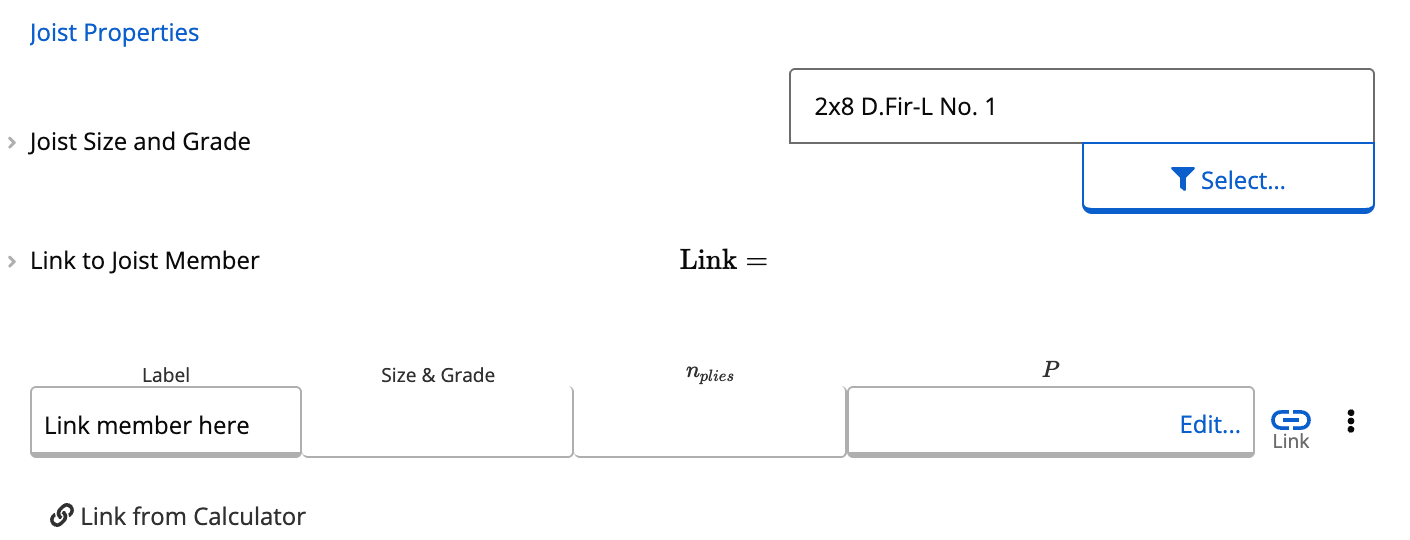
On the left side of the calculator, you’ll see the **Joist Properties** section. You have two options:
**Option A: Manually Select Joist Size and Grade**
1. Open the joist size selector.
2. Choose from the database of wood sections.\
Example: type **“2x8”** → select **Douglas Fir No. 1**.
3. Define the **supporting member**, which can be another wood size/grade.\
Example: **2×8 Douglas Fir No. 1** supporting member.
**Option B: Link to a Joist Member**
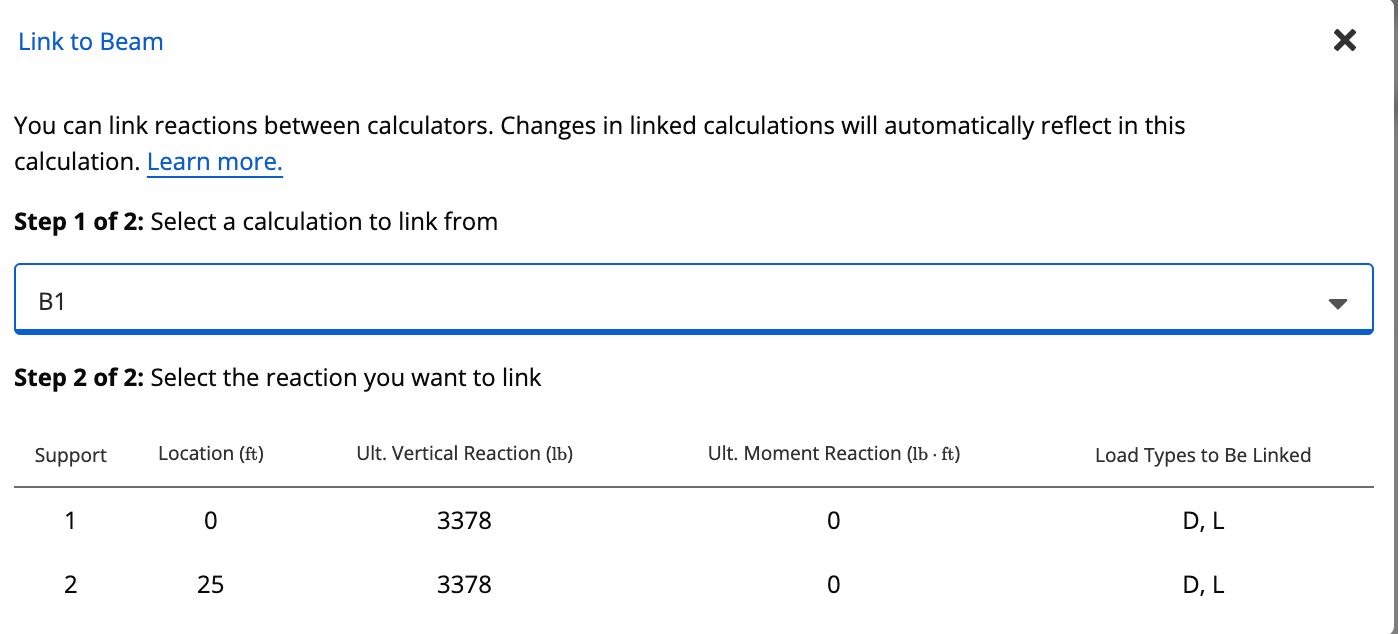
This works the same as how loads link in many of our other calculators. When using **Load Linking**, the calculator automatically imports relevant joist properties and reactions.
**How to Link**
1. Click **Link to Joist Member** → **Link**.
2. Select the appropriate member (e.g., **Beam 1** if previously created).
3. The calculator automatically:
* Pulls in the **joist size and grade**
* Imports the **reaction loads**
* Hides manual joist size and load inputs.
This ensures all values remain consistent with upstream calculations.
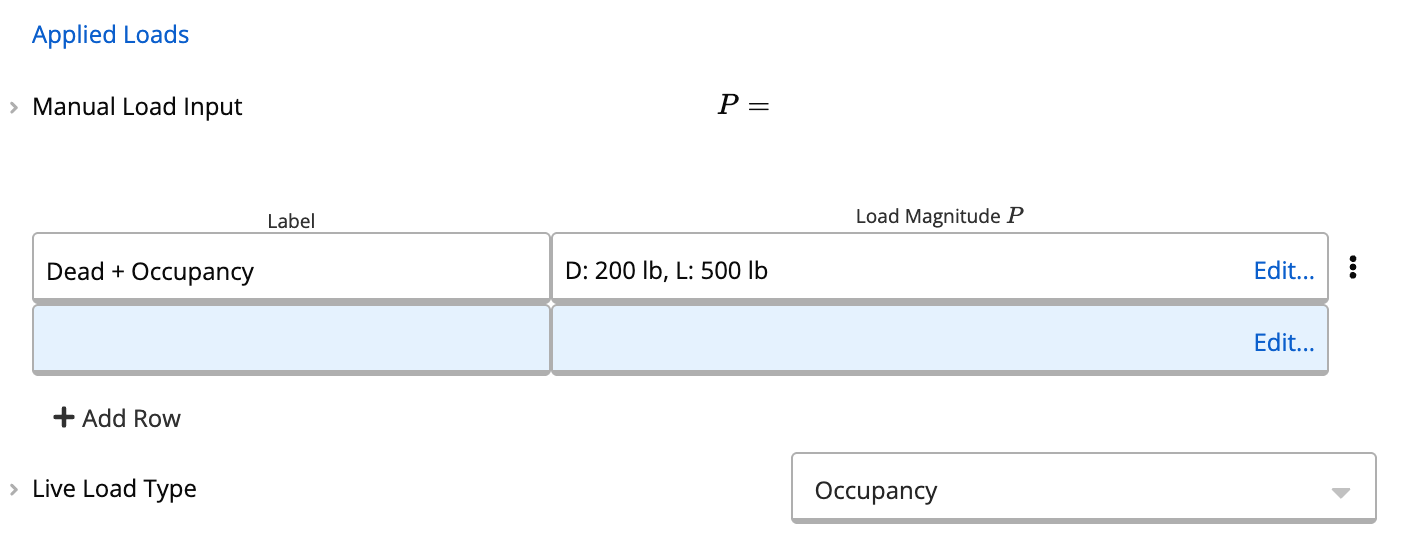
Below the joist properties is the **Load Input** panel. These inputs represent the **reaction forces** from the joist onto the connector.
Typical loads include:
* Roof live load
* Dead load
* Snow/rain load
* Floor load
Example: entering a **200 lb roof live load**.
Once loads are entered, the calculator evaluates connector options.
For uplift forces, input these loads as negative values (i.e. -500 lb) so that uplift checks are considered.
If the initially displayed connector isn’t compatible (e.g., a 2x4 hanger with a 2x8 joist), use the connector selector:
1. Open the **Member Selector**.
2. Type the intended joist depth (e.g., “2x8”).
3. Review available connector models.
Example:\
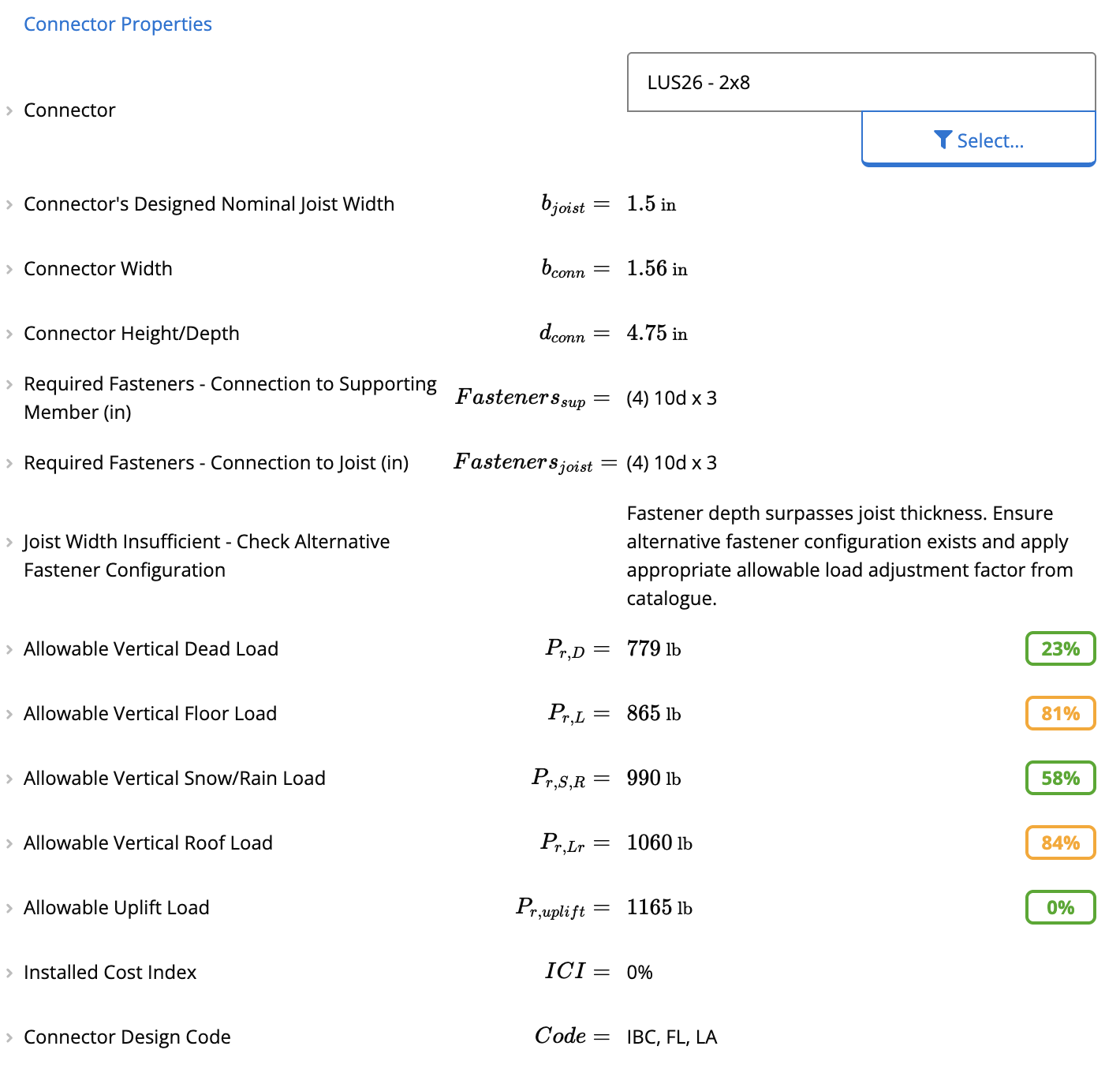
Selecting **Simpson Strong-Tie LUS26**:
* The calculator confirms that allowable vertical loads (dead, live, snow/rain) all pass.
* Installed Cost Index (ICI) shows **0%**, indicating the lowest-cost option in the library.
* Required fasteners are displayed (e.g., **4× 10d nails** on both joist and supporting member).
This workflow is ideal for **quick standalone connection checks**.
Because linking may change joist depth or loads, the previously selected connector may no longer be compatible.
Example:
* The LUS26 becomes incompatible because the joist hanging depth must be at least **60% of joist depth** to prevent rotation.
* Use the selector to view compatible alternatives:
* **LUS28** (face-mounted) - compatible and lowest ICI (Installed Cost Index).
* **JB210A** - works for certain conditions.
* **HU210TF** - available but may not pass load checks.
Once selected, the calculator displays:
* Governing checks
* Required fasteners (e.g., **6 fasteners** into supporting member, **4** into joist)
* Load verification results
After linking and selecting a suitable hanger:
* Confirm all governing load checks pass.
* Review fastener requirements.
You now have a fully validated joist-to-hanger connection based on live data from your joist design!
#### Example Video
This video shows an in depth example for the wood connector calculator in action
## Common questions
This calculator uses allowable load values from the Simpson Strong-Tie Wood Construction Connectors Catalog 2026-2027. Load duration factors are applied per NDS 2024 Table 2.3.2 (ASD), CD = 0.9 for dead/storage loads, 1.0 for floor live, 1.15 for snow/rain, 1.25 for roof live, and 1.6 for wind uplift. Allowable loads are taken directly from catalog tables and are not independently calculated.
You specify a connector model from the Simpson Strong-Tie database, the joist size and grade (or link a member from a Wood Beam calculator), the number of plies (1-5), the supporting member species (DF, SP, SPF, or HF) and dimensions, and applied loads broken down by load type. A live load type selection (storage, occupancy, or impact) controls the duration factor applied to live loads.
The calculator checks five allowable load utilization ratios: dead (CD=0.9), floor live (CD=1.0), snow/rain (CD=1.15), roof live (CD=1.25), and uplift (CD=1.6), each against the connector's catalog value. It also verifies dimensional compatibility (joist width match, connector depth at least 60% of joist depth for face-mount hangers, top flange width within supporting member width), fastener length vs. supporting member width, and connector suitability for the selected species and joist type. Outputs include required fasteners, allowable loads, installed cost index, and connector design code.
Yes. The calculator supports glulam, LVL, LSL, PSL, and I-joist members through dedicated Face Mount, (I-Joist, Glulam, SCL) connector entries. For these members, allowable loads are adjusted by the ratio of the joist's actual bearing strength (F'c⊥) to the 750 psi catalog basis. For SPF or HF supporting members, an additional uplift reduction applies: 0.86 for nailed headers and 0.72 for screwed headers, per the Simpson catalog.
Use the Link to Joist Member table to connect directly to a Wood Beam (ASD) calculator. Once linked, the joist size, number of plies, and end reactions by load type are imported automatically and the manual member selector disappears. Linking is permanent for that sheet, so if you need to change the joist member afterward, start a new connector calculation. Only vertical (axial) loads are transferred, moment loads at the connection are not permitted.
 **Option A: Manually Select Joist Size and Grade**
1. Open the joist size selector.
2. Choose from the database of wood sections.\
Example: type **“2x8”** → select **Douglas Fir No. 1**.
3. Define the **supporting member**, which can be another wood size/grade.\
Example: **2×8 Douglas Fir No. 1** supporting member.
**Option B: Link to a Joist Member**
This works the same as how loads link in many of our other calculators. When using **Load Linking**, the calculator automatically imports relevant joist properties and reactions.
**How to Link**
1. Click **Link to Joist Member** → **Link**.
2. Select the appropriate member (e.g., **Beam 1** if previously created).
3. The calculator automatically:
* Pulls in the **joist size and grade**
* Imports the **reaction loads**
* Hides manual joist size and load inputs.
This ensures all values remain consistent with upstream calculations.
**Option A: Manually Select Joist Size and Grade**
1. Open the joist size selector.
2. Choose from the database of wood sections.\
Example: type **“2x8”** → select **Douglas Fir No. 1**.
3. Define the **supporting member**, which can be another wood size/grade.\
Example: **2×8 Douglas Fir No. 1** supporting member.
**Option B: Link to a Joist Member**
This works the same as how loads link in many of our other calculators. When using **Load Linking**, the calculator automatically imports relevant joist properties and reactions.
**How to Link**
1. Click **Link to Joist Member** → **Link**.
2. Select the appropriate member (e.g., **Beam 1** if previously created).
3. The calculator automatically:
* Pulls in the **joist size and grade**
* Imports the **reaction loads**
* Hides manual joist size and load inputs.
This ensures all values remain consistent with upstream calculations.