> ## Documentation Index
> Fetch the complete documentation index at: https://calcs.com/docs/llms.txt
> Use this file to discover all available pages before exploring further.
# Upgrade Calculations to the Latest Version
> Upgrade Calcs.com calculations to the latest published module version and roll back if needed.
Our team are constantly upgrading and improving Calcs.com to provide new functionality, respond to user requests, and fix any errors or bugs that might arise. We will never change a calculation without asking you, however our calculation upgrade feature enables you to upgrade all calculations in a project to the latest version at the click of a button. If for any reason you need to go back, your old version is retained and you can roll back after upgrading. If you'd like to understand how a calculation has changed, don't forget you can view all changes for a given module in the [module changelog](/docs/running-calculations/updating-calculations-and-codes/view-changelog-new-calculation-module-version).
## How to upgrade calculations
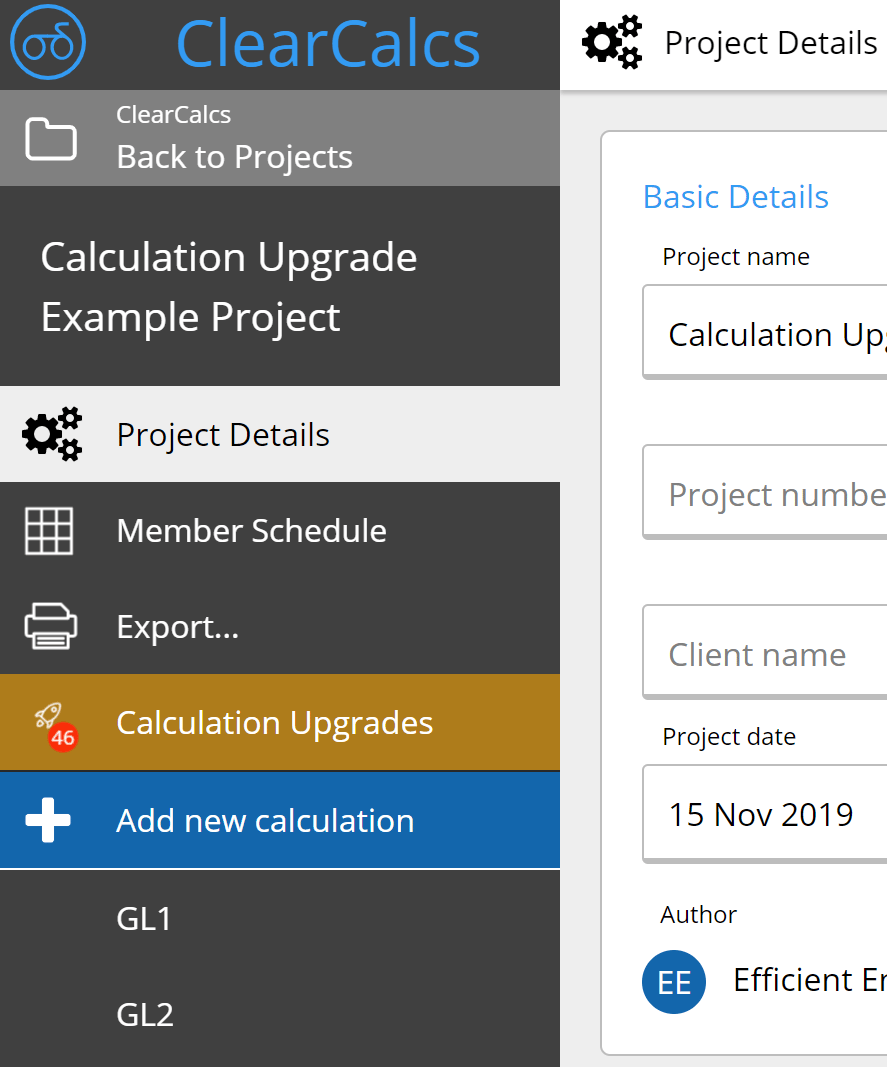
To upgrade your calculations, you will need to open any project containing calculations that are outdated. Calcs.com will automatically detect this, and you will see a gold "Calculation Upgrades" button in the left sidebar of your selected project.
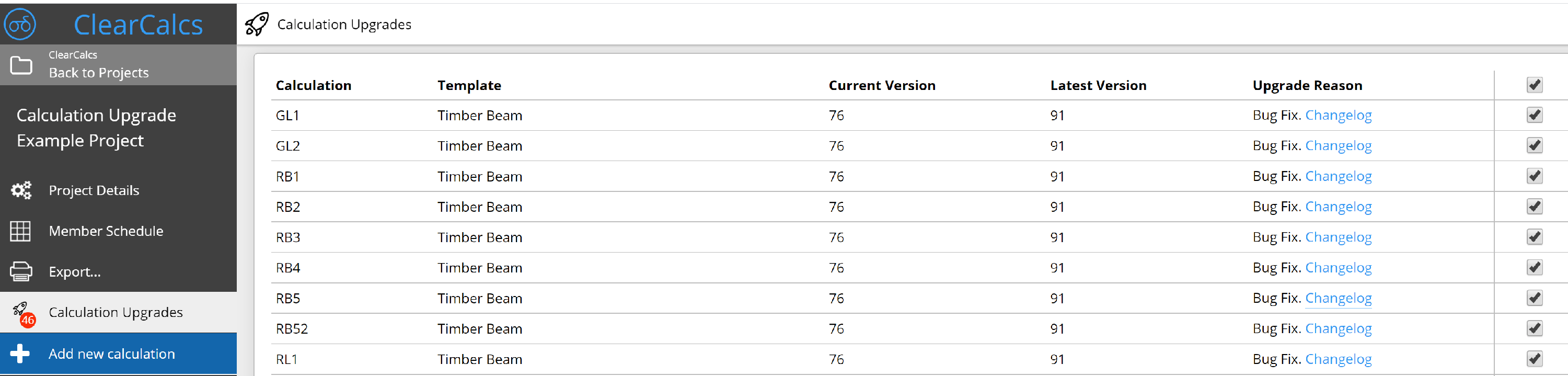
 Once you click the Calculation Upgrades button, you will be taken to the upgrade screen where you can view all calculations that have available upgrades, view what has changed in the calculation module's changelog, and deselect any calcs you do not wish to be upgraded. N.B. That for some extremely old calculation modules, we are unfortunately unable to offer upgrades - these will be marked as obsolete and will stay accessible but will not be upgraded. We recommend manually replacing or deleting these calculators.
 Once you commence the calculation upgrade, you will be given the option of exporting to PDF before you upgrade, or continuing without exporting. You'll be able to rollback later, however we still recommend exporting a copy for your records.
Once the upgrade completes, the page will reload and you will be shown the upgrade status - this message will persist for 3 more days. It will also show if you enter anyone elses project that has been upgraded. During this time, you may revert the upgrade and restore the old calculations, or double check the upgrade by clicking 'Compare Results' - this will let you compare the current and previous utilization (adequacy) of the calculation to visually check if there has been any highly substantial change. For minor changes and feature upgrades, there should generally be no change to this number.
Once you commence the calculation upgrade, you will be given the option of exporting to PDF before you upgrade, or continuing without exporting. You'll be able to rollback later, however we still recommend exporting a copy for your records.
Once the upgrade completes, the page will reload and you will be shown the upgrade status - this message will persist for 3 more days. It will also show if you enter anyone elses project that has been upgraded. During this time, you may revert the upgrade and restore the old calculations, or double check the upgrade by clicking 'Compare Results' - this will let you compare the current and previous utilization (adequacy) of the calculation to visually check if there has been any highly substantial change. For minor changes and feature upgrades, there should generally be no change to this number. ## Frequently asked questions
When a standard is updated, Calcs.com updates the affected calculators and notifies users. You do not need to rebuild or re-verify your existing calculation templates. The update happens in the tool.
Affected calculators are updated by the Calcs.com engineering team when standards change. Teams stay current without manual spreadsheet maintenance or revalidation across existing files.
Yes. When a standard is revised, affected calculators are reviewed, updated, and re-tested before the change goes live. Engineers who have used a calculator that changes are notified directly in the app. You can review the changelog before accepting the upgrade. You can also roll back after upgrading if needed, and compare pre- and post-upgrade results to check for any material change. Version history records what changed and when.
When a standard is revised, Calcs.com updates the affected calculations and documents the change. Existing calculations retain the version that was current when they were run.
## Frequently asked questions
When a standard is updated, Calcs.com updates the affected calculators and notifies users. You do not need to rebuild or re-verify your existing calculation templates. The update happens in the tool.
Affected calculators are updated by the Calcs.com engineering team when standards change. Teams stay current without manual spreadsheet maintenance or revalidation across existing files.
Yes. When a standard is revised, affected calculators are reviewed, updated, and re-tested before the change goes live. Engineers who have used a calculator that changes are notified directly in the app. You can review the changelog before accepting the upgrade. You can also roll back after upgrading if needed, and compare pre- and post-upgrade results to check for any material change. Version history records what changed and when.
When a standard is revised, Calcs.com updates the affected calculations and documents the change. Existing calculations retain the version that was current when they were run.