> ## Documentation Index
> Fetch the complete documentation index at: https://calcs.com/docs/llms.txt
> Use this file to discover all available pages before exploring further.
# Standards Library Overview
> What the Standards Library is, where to find it, and what's included in your organisation's access.
The Standards Library gives you the full text of the building standards and codes your organisation has access to, searchable by clause and readable right alongside the calculators that reference them.
You'll find it under **Standards** in the left-hand navigation, between **Builder** and **Integrate**. No separate login or setup step is required — if your organisation has access to a standard, it appears here automatically.
## What you'll see
Opening **Standards** takes you to **Standards and Codes**, a card grid of every standard your organisation has access to. Each card shows:
* **Designation and title** — for example `AS 2118.6:2026`, *Automatic fire sprinkler systems, Part 6*
* **Status** — a badge such as `[Current]`
* **Published** and **Updated** dates
* **Amendment notes**, where relevant (for example, "Includes Amendment 1")
* A **document type** chip, such as `Full Standard`
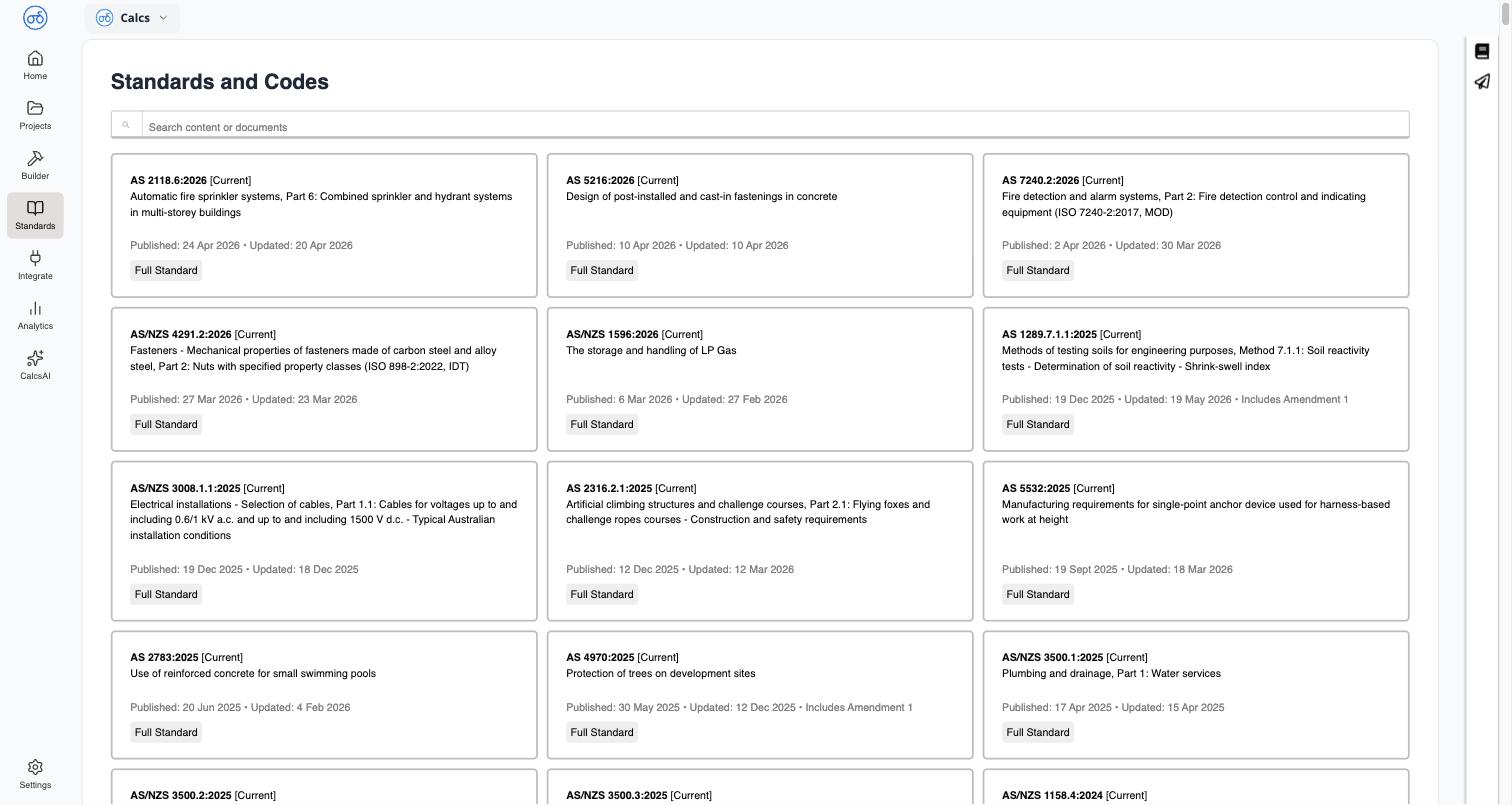 A search box sits at the top of the page. It searches the actual clause and table content of every standard you have access to, not just titles — see [Searching Standards and Clauses](/docs/standards_library/searching_standards_and_clauses).
## What's included in your access
The standards shown are whatever your organisation is licensed for — this can include Australian Standards (AS and AS/NZS), and other codes depending on your subscription. What you can *do* with a standard beyond reading and searching it — printing, downloading — depends on your organisation's license type for that specific standard; see [Standards Licensing & Copyright](/docs/standards_library/standards_licensing_and_copyright).
## Where else you'll run into it
The Standards Library isn't only a standalone reference — it's woven into the calculators themselves. Every design check traces back to the clause it's based on:
Navigate a standard's table of contents and read a clause
Copy a stable link straight to a specific clause
Jump from a calculation result to the exact clause it's checking against
Save a licensed standard for your records
A search box sits at the top of the page. It searches the actual clause and table content of every standard you have access to, not just titles — see [Searching Standards and Clauses](/docs/standards_library/searching_standards_and_clauses).
## What's included in your access
The standards shown are whatever your organisation is licensed for — this can include Australian Standards (AS and AS/NZS), and other codes depending on your subscription. What you can *do* with a standard beyond reading and searching it — printing, downloading — depends on your organisation's license type for that specific standard; see [Standards Licensing & Copyright](/docs/standards_library/standards_licensing_and_copyright).
## Where else you'll run into it
The Standards Library isn't only a standalone reference — it's woven into the calculators themselves. Every design check traces back to the clause it's based on:
Navigate a standard's table of contents and read a clause
Copy a stable link straight to a specific clause
Jump from a calculation result to the exact clause it's checking against
Save a licensed standard for your records