> ## Documentation Index
> Fetch the complete documentation index at: https://calcs.com/docs/llms.txt
> Use this file to discover all available pages before exploring further.
# Viewing Clauses from Inside a Calculator
> Jump from any calculation result straight to the standard clause it's based on, without leaving your calculation.
Every governing check in a Calcs.com calculator links back to the clause it's based on. You don't need to leave your calculation, or go looking through the standard yourself, to see exactly where a formula comes from.
## Formula Reference
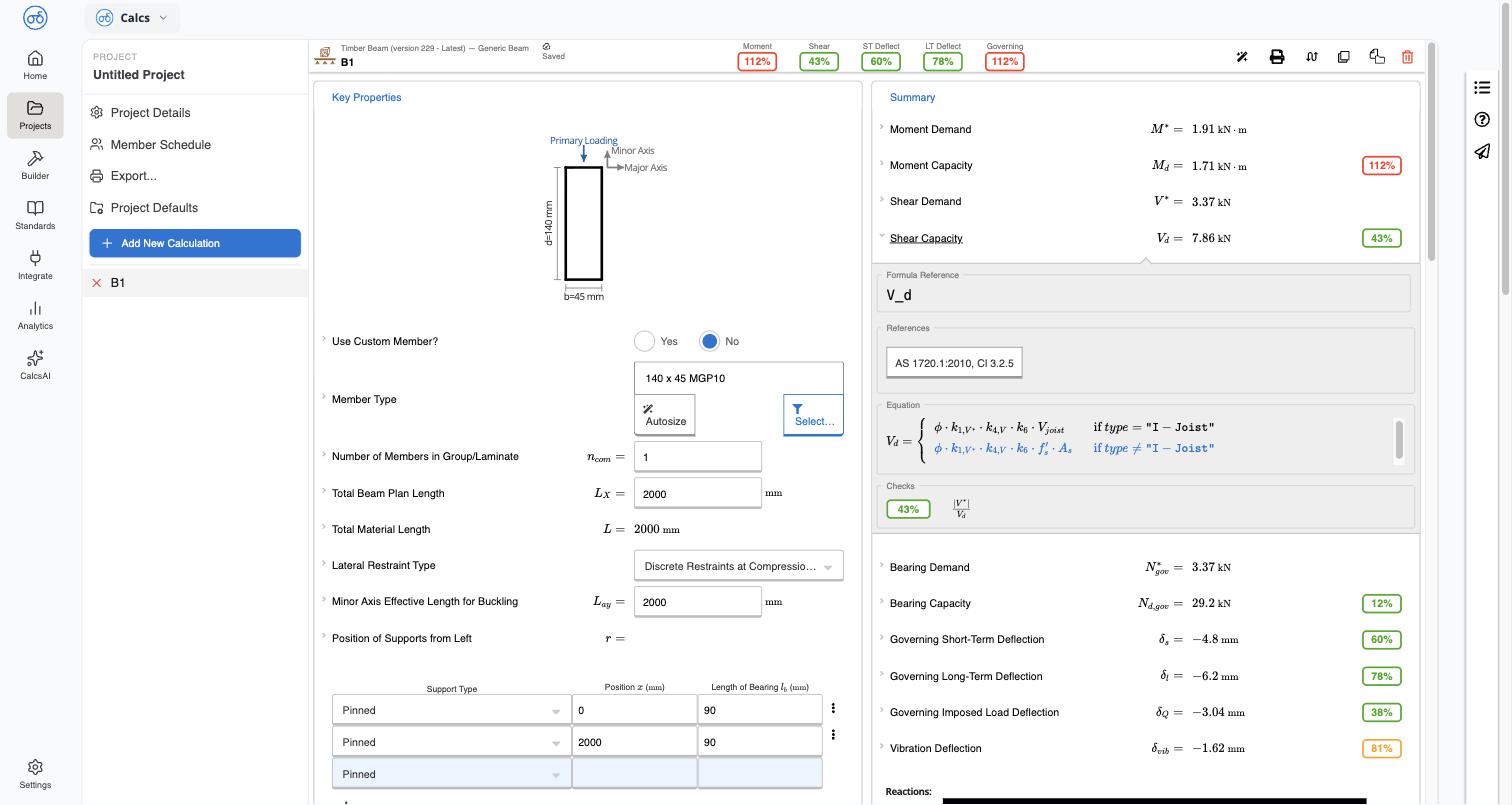
Expand any result row in **Summary** — for example **Moment Capacity** — to open its **Formula Reference** panel. This shows:
* The equation variable being calculated (for example `M_d`)
* A **References** chip naming the governing clause, for example `AS 1720.1:2010, Cl 3.2.1.1`
* The full equation as used in the calculator, including any conditional cases (for example a separate equation for I-joists)
* The **Checks** result — the utilization ratio and what's being compared (for example *Bending Moment Demand is Greater than Bending Moment Capacity*)
This is the fastest way to understand *why* a result passed or failed — the equation shown here is the one actually driving the number in Summary, not a general description of the check.
 ## Opening the full clause
Select the clause chip in **References** to open a side panel with:
* The clause text, exactly as it reads in the standard (for example *3.2.1.1 Design capacity*)
* The equation and every defined variable, with cross-references to related clauses where the standard itself references them (for example *see Clause 1.4.2.2*)
* The standard's reproduction and copyright notice
## Opening the full clause
Select the clause chip in **References** to open a side panel with:
* The clause text, exactly as it reads in the standard (for example *3.2.1.1 Design capacity*)
* The equation and every defined variable, with cross-references to related clauses where the standard itself references them (for example *see Clause 1.4.2.2*)
* The standard's reproduction and copyright notice
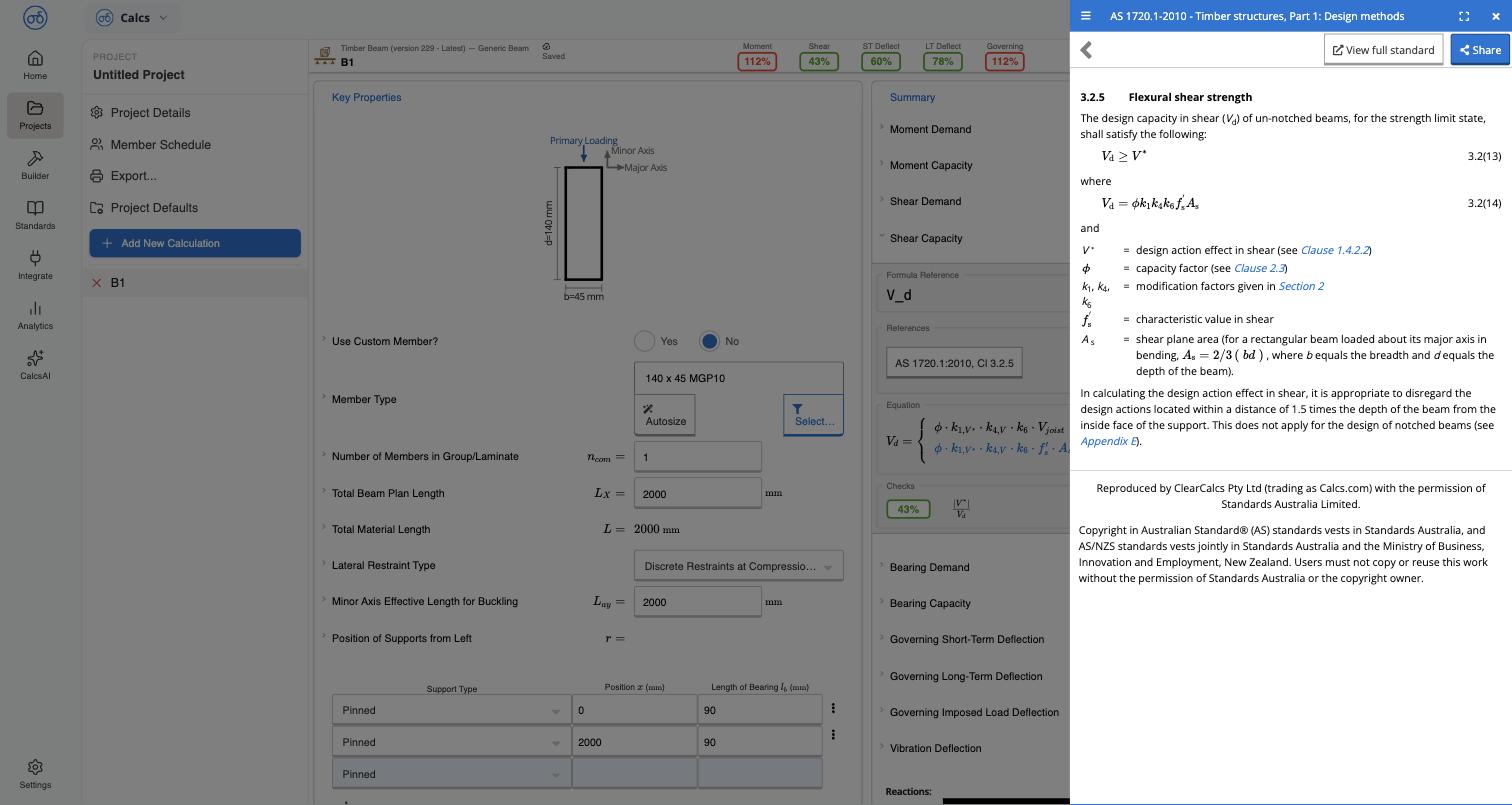 A **Share** button in this panel copies a stable link to the clause — see [Sharing a Clause Link](/docs/standards_library/sharing_a_clause_link).
## Viewing the full standard
Select **View full standard** in the side panel to open the same clause in the full Standards Library viewer, with its Table of Contents — see [Browsing a Standard](/docs/standards_library/browsing_a_standard). This takes you out of the calculator and into the standard itself, useful when you want to read the surrounding clauses or trace a chain of cross-references.
## Related
Navigate a standard's table of contents and read a clause
What the reproduction notice means for what you can do with the content
A **Share** button in this panel copies a stable link to the clause — see [Sharing a Clause Link](/docs/standards_library/sharing_a_clause_link).
## Viewing the full standard
Select **View full standard** in the side panel to open the same clause in the full Standards Library viewer, with its Table of Contents — see [Browsing a Standard](/docs/standards_library/browsing_a_standard). This takes you out of the calculator and into the standard itself, useful when you want to read the surrounding clauses or trace a chain of cross-references.
## Related
Navigate a standard's table of contents and read a clause
What the reproduction notice means for what you can do with the content