

Use a Formula
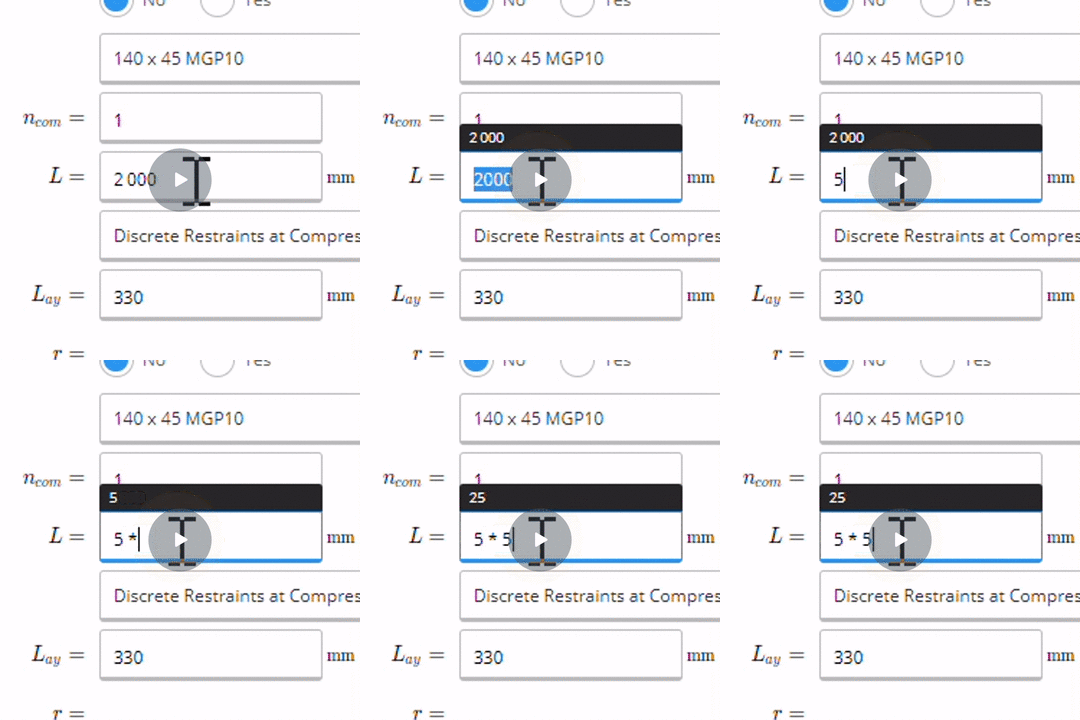
- Simply start typing a formula into any input field
- Type in your preferred formula (for example )
- Calcs.com will automatically perform the calculation, including
Convert Units
Note: This article is about converting units in an input. If you’d like to change the unit system for your entire project, including in all the output numbers, see the article How to Change Unit Systems Units may be used in any input field. You can even perform calculations with units, such as Calcs.com recognises hundreds of different types of units, and if you’re using the metric system, all the standard SI prefixes (u, m, c, k, M, G, etc.). Some examples of common units are listed below, but many others are also available - if you want to enter a length in “rods” or a volume in “teaspoons”, you can do that too! First, a few general notes:- You can type either the full name of a unit or just its abbreviation
- You may optionally include an “s” at the end of a unit (e.g. “lb” and “lbs” are the same thing)
- For multiplied units, such as units of moment, you may use the multiplication symbol ”*” or simply insert a space between the units (e.g. “kN m” or “kN*m” are the same thing)
- Be cautious about “Mass” versus “Force or Weight” (especially in the Imperial system, where both units are confusingly called “pounds”). Weight is equal to Mass times the force of gravity, which you can convert in Calcs.com as, for example, “5 kg * gravity” (“gravity” is a constant equal to 32.18 ft/s^2 or 9.807 m/s^2)
| Unit Type | Metric Units | Imperial Units |
|---|---|---|
| Length | meter (m) | mil, inch (in), foot (ft), yard (yd) |
| Surface Area | , , , | (sqmil), (sqin), (sqft), (sqyd) |
| Volume | , , (cc), litre (L) | , (cuin), (cuft), (cuyd) |
| Angles | degree (deg), radian (rad) | degree (deg), radian (rad) |
| Mass | gram (g), kg, tonne | ton, ounce (oz), poundmass (lbm) |
| Force or Weight | newton (N), kN, MN | poundforce (lb* or lbf), kip |
| Moment | N m, kN m, N mm | lb ft, lb in, kip in |
| Pressure | Pa, kPa, MPa, GPa | psi, ksi*, psf, ksf* |
| Mass Density | kg/, g/ | lbm/, lbm/, oz/ |
| Weight Density | N/, kN/ | lb/ (pci*), lb/ (pcf*), kip/ (kcf*) |
| Force per Length | N/m, kN/m, N/mm, kN/mm | lb/ft (plf*), kip/ft (klf*) |
| Temperature | celsius (degC), kelvin (K) | fahrenheit (degF), rankine (degR) |
| Time | second (s), hour (h or hr), day, year | second (s), hour (h or hr), day, year |