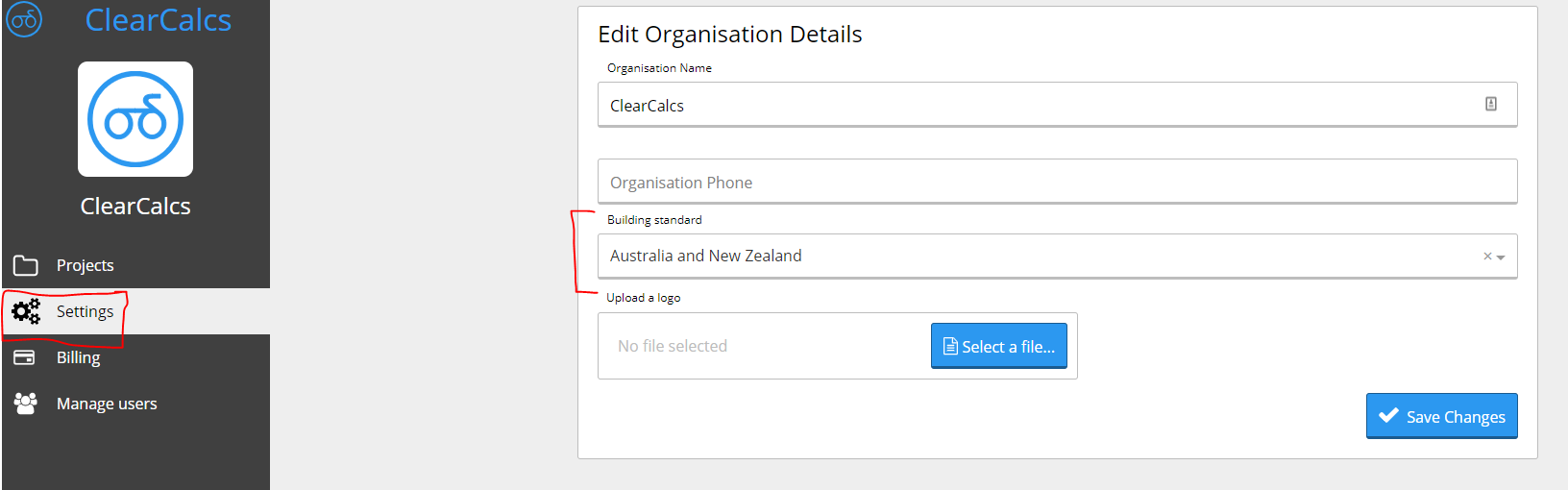
You can change your default building standard on your organisation settings page.
You can change your default building standard on your organisation settings page.When you sign up, Calcs.com will automatically assign a default building standard based on your selected country of origin (For example, USA, or Australia). By default, your calculations will align with the country you selected signing up. When you add a new calculation in a project, for example, this means that if your selected default is the United States, you will get US calculations which are imperial by default. To get a different building standard, you must change your default building standard in settings.N.B. This setting will affect your entire organisation, and can only be done by an administrator (if you just created a trial, you are the administrator by default).To change your default building standard you must:
Log into Calcs.com
Go to the project home screen
Click ‘Settings’ in the left sidebar
Choose a new building standard in the dropdown
Save changes
Was this page helpful?
⌘I
Assistant
Responses are generated using AI and may contain mistakes.