

Relevant Calculators: This feature is available in Wood Beam (ASD), Wood Beam (LRFD), and One-Way Slab calculators for multi-span continuous structures.
What is Live Load Patterning?
Live load patterning (also known as automatic unbalanced loads) is a structural engineering analysis technique used to determine the most critical loading conditions for continuous beams and multi-span structures. When enabled, Calcs.com automatically generates multiple load combinations by applying live loads in different patterns across spans to find the worst-case scenarios for moments, shears, and deflections. For a deeper dive into the importance of live load patterning, practical examples, and code provisions, see our blog article: Live Load Patterning and Why It Is Important in Structural Analysis.Why Does It Matter?
In continuous structures, live loads do not always occur uniformly across all spans simultaneously. For example, in a multi-story building, people might gather in one room while the adjacent hallway remains empty. To ensure structural safety, engineers must analyze various load arrangements to identify the most critical conditions. Key Benefits:- It instantly generates necessary load patterns, reducing the risk of missing critical cases.
- It helps ensure compliance with design guidance from building codes and standards (such as IBC, ASCE 7, and ACI 318) that recommend or require consideration of live load patterning for continuous structures.
- It helps identify true worst-case scenarios, ensuring safety where it counts while avoiding over-engineering elsewhere.
When to Use Live Load Patterning
Before enabling this feature, check if it applies to your specific design scenario.Recommended For:
- ✅ Multi-span continuous beams essential for beams running over multiple supports.
- ✅ Structures where live loads can vary independently across spans.
- ✅ Design scenarios requiring code-compliant unbalanced load analysis.
Not Required For:
- ❌ Single span beams do not require patterning.
- ❌ Cantilevers without continuous backspans.
- ❌ Structures where live loads always occur uniformly (e.g., liquid storage).
Technical Requirements
To successfully use Live Load Patterning, your calculation must meet these criteria:- The beam must have at least two spans (which requires three or more support points).
- Spans are divided strictly based on the support locations you define.
How It Works
When automatic live load patterning is enabled, the system handles the heavy lifting:- The feature automatically detects all spans in your beam based on support locations.
- For distributed (psf) and line (plf) live loads, Calcs.com creates multiple combinations by applying loads in different arrangements across spans.
- The solver analyzes all patterns to provide envelope results showing maximum and minimum values for moments, shears, reactions, and deflections.
Example: Two-Span Continuous Beam
Consider a two-span beam with a uniform live load: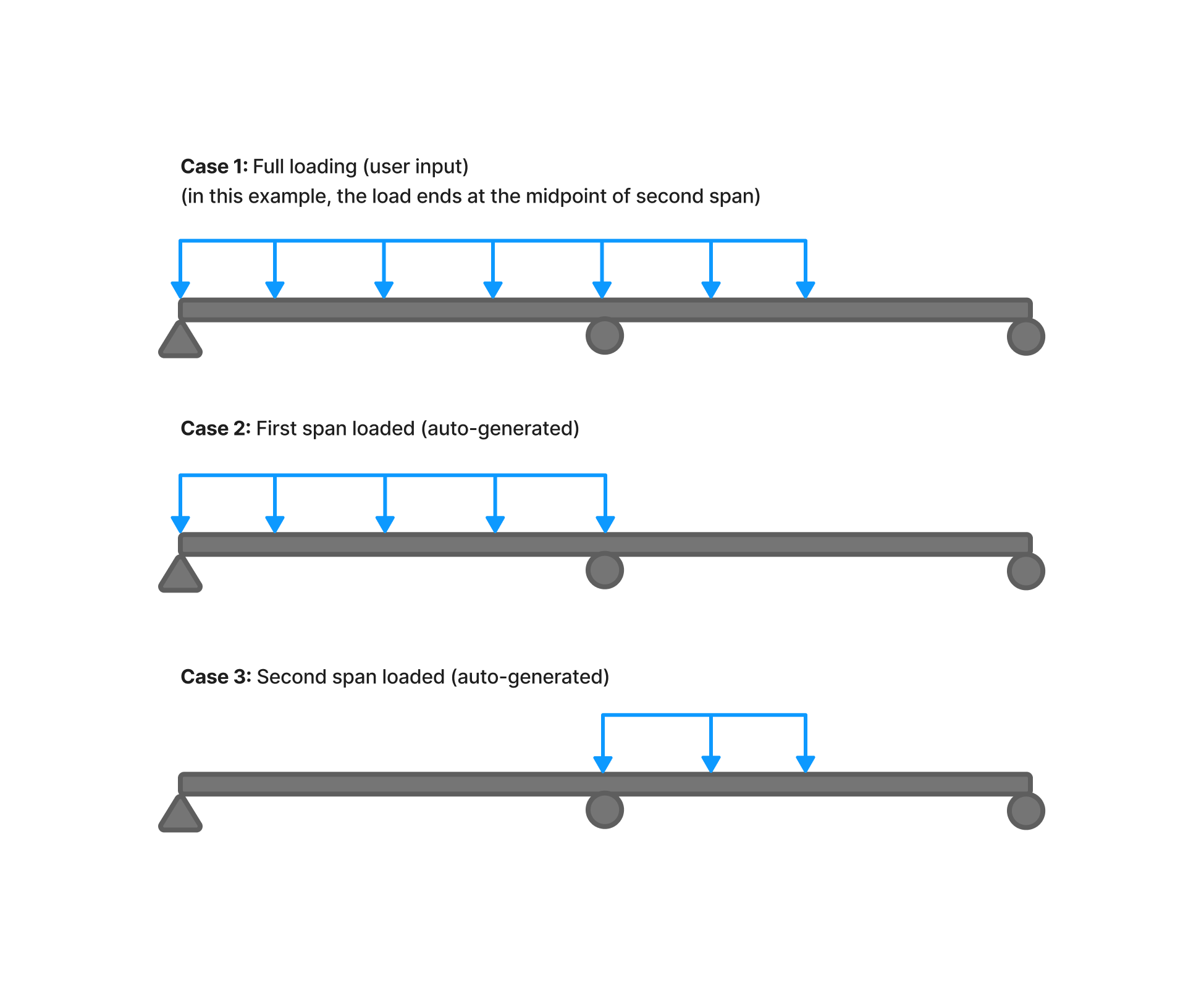
- Full live load on both spans.
- Live load on Span 1 only (Span 2 is unloaded).
- Live load on Span 2 only (Span 1 is unloaded).
How to Use It
1
Create the Calculator
Start by creating a new Wood Beam (ASD) or Wood Beam (LRFD) calculation from the member library.
2
Define Supports
Go to the “Supports and Braces” widget.Add your supports here. Crucial: You must define at least three supports (creating two or more continuous spans) for the patterning feature to activate.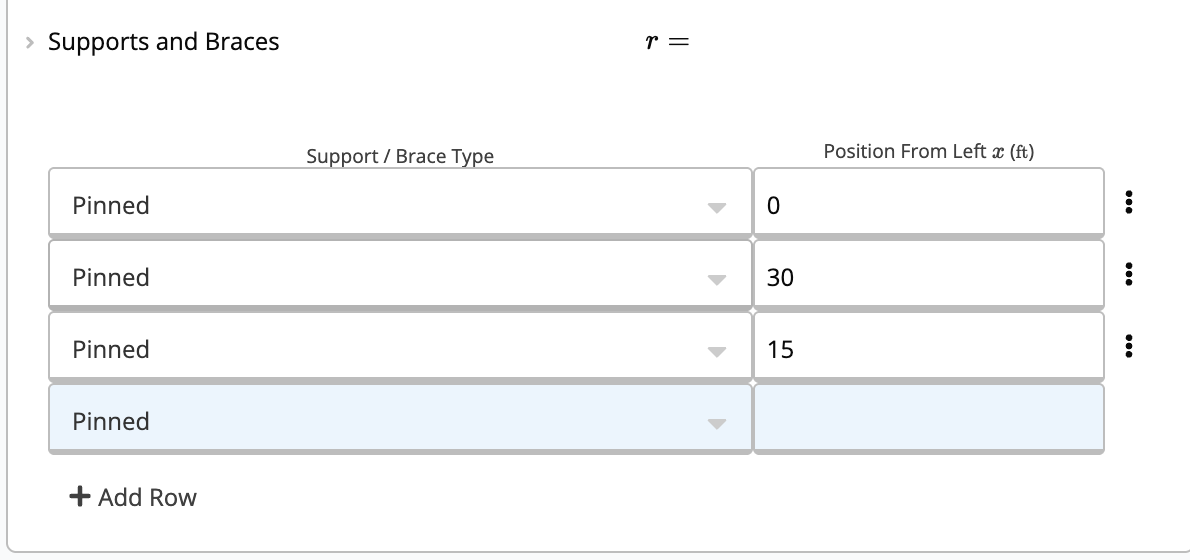
3
Define Loads & Enable Patterning
Scroll down to the “Loads” section.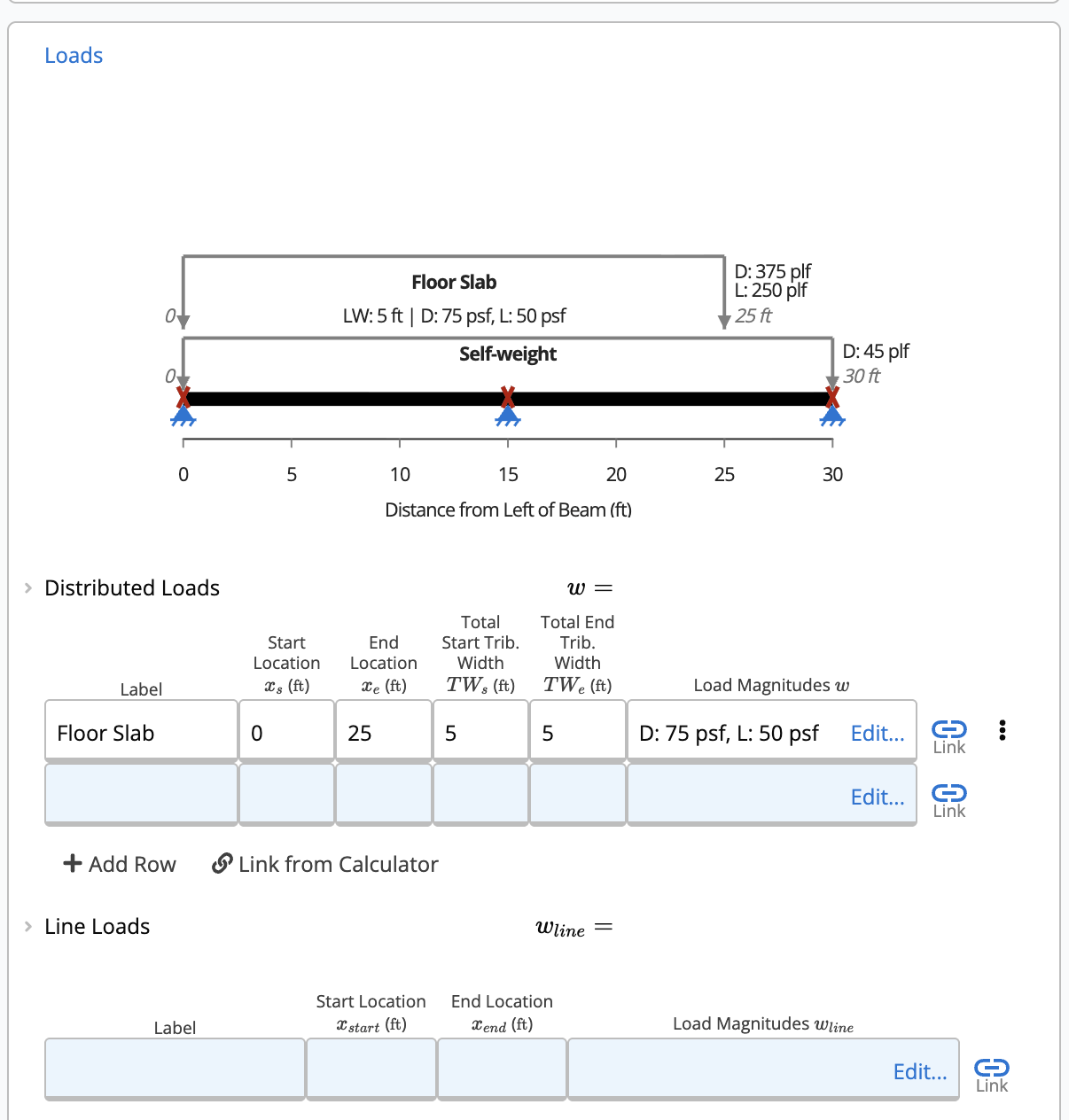

- Enter your loads in the Distributed Loads or Line Loads tables.
- Important: Ensure you select “(L) Live Load” in the “Load Type” column. Only loads tagged as “Live” in these specific tables will be patterned.
- In this same section (below the load tables), locate the “Enable Automatic Live Load Patterning? (BETA)” toggle and select “Yes”.
4
Review Results
After the calculation runs, look at the Summary section at the top of the page. The values shown for Moment, Shear, and Deflection are the Envelope Results—the absolute maximums found across all the different pattern combinations.Comparison of Results:
| Feature Disabled (Toggle OFF) | Feature Enabled (Toggle ON) |
|---|---|
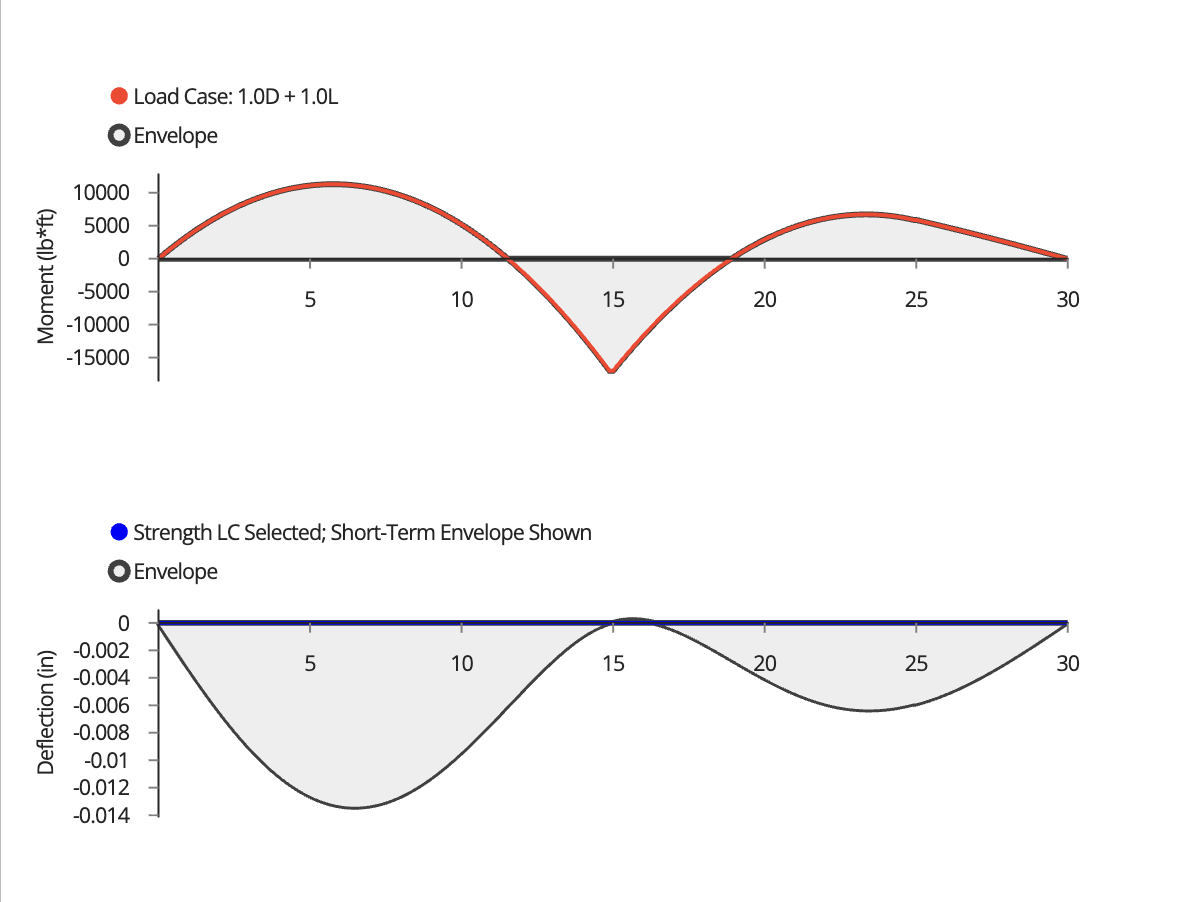 | 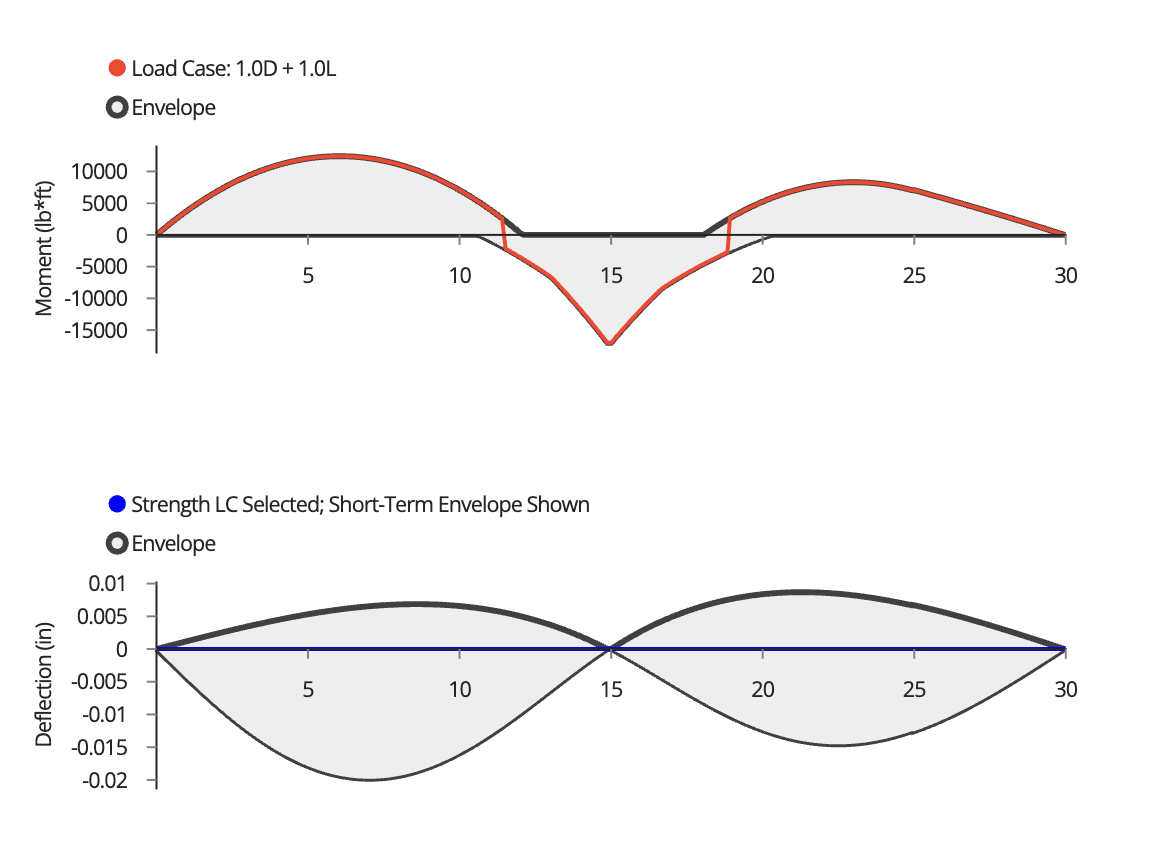 |
| Results analyze full span loading only. | Results show the worst-case envelope from all patterns. |
Current Limitations (Beta Feature)
This is a Beta feature under active development. For more information about what this means, see What is a Beta Module?. While results are validated, the following display limitations currently exist:- The load diagram does not yet visually show the different span arrangements hopping around; it displays the input loads.
- Specific results for individual live load arrangements cannot be viewed separately; only the overall envelope is shown.
- The free-body diagram may display double the line loads for patterned types (e.g., showing 200 plf for a 100 plf load). Calculations correctly use the actual entered load (e.g., 100 plf).
Note: This feature is continuously improved. Check back for updates as we enhance display capabilities and the ability to view individual load patterns.