
Structural engineering software helps you size, analyze, and check structural members against building codes, then document the result so it can be reviewed and defended. The right choice depends on the work you do: some tools focus on analysis, some on design and code checking, and some on both. This guide compares the main options on the criteria that decide real projects: code compliance, transparency of the calculation, collaboration, and how quickly your team can adopt it. Calcs.com is a standards-aligned calculation platform used by engineers in the US, AU, CA, NZ, and EU.
Last updated: August 2026.
Why engineers are replacing spreadsheets with structural engineering software
With fixed-fee projects becoming the norm and engineering teams often stretched thin, structural engineers, especially in small to medium-sized teams, are under pressure to deliver faster designs and stay code-compliant.
Traditional spreadsheet-based workflow just aren’t cutting it. Manual inputs, inconsistent formulas, and limited traceability increase the risk of errors and rework.
If you’ve ever spent hours wrangling formulas in Excel or double-checking your calcs before a submission, you’ve felt the pain of “Spreadsheet Stress.” Common issues include:
- Wasting hours building or updating Excel models
- Losing confidence due to inconsistent or outdated formulas
- Struggling with code compliance and version tracking
- Having to manually write out calculations for submissions to meet client or legislative requirements
- Errors in spreadsheet formulas
- Client dissatisfaction from slow turnarounds on design, particularly during the construction phase
It’s more than just annoying, it's risky. According to industry data, engineers spend up to 30% of their time managing data manually, and 1% of all spreadsheet formula cells contain errors, even a small mistake can lead to non-compliant designs or costly rework.
But even when engineers are ready to move on from spreadsheets, choosing the right structural engineering software is far from easy. Forum discussions on Reddit and Eng-Tips reveal a common theme: choosing software can feel like trial and error.
Engineers regularly share stories of tools that are either overkill (“I bought a license for ETABS and only use 10% of it”), painfully complex (“Feels like I need a course to design a beam”), or misaligned with local needs (“None of these packages understand how we design timber in Australia”).
With dozens of structural software packages on the market, it’s easy to feel overwhelmed when trying to compare tools across pricing, features, and regional relevance.
That’s why we created this guide; to help engineers in Australia and the United States move beyond spreadsheet stress and make confident, informed decisions when choosing structural engineering software that actually fits their workflow, project type, and business model.
How structural engineering software supports modern workflows
Structural engineering software can be divided into three primary categories, each supporting different stages of the design process. Understanding the differences can help you choose the right tool for your workflow.
| Category | Purpose | Examples |
|---|---|---|
| Design software | Assists with creating plans and drafting documents | AutoCAD, Autodesk’s Revit, ArchiCAD |
| Structural analysis software | Simulates forces, stresses, and load paths in structures, often using the Finite Element Method (FEM) or Finite Element Analysis (FEA) to model complex behavior in systems such as trusses and portal frames. | ETABS (by CSI), STAAD.Pro (by Bentley Systems), SpaceGASS, Tekla Structures, SkyCiv, SAP2000 |
| Calculation software | Ideal for rapid checks on beams, columns, and even more localized structural systems like footings or retaining walls, with code-aligned outputs ready for documentation. | Calcs.com, Structural Toolkit, Enercalc, StruCalc |
Which structural software type do you actually need?
- If you're primarily drafting or documenting, design tools like AutoCAD or Revit are essential.
- If your projects involve complex load paths or high-rise structures, analysis tools like ETABS or SpaceGASS simulate behavior under force.
- But if you need quick, reliable member checks, and want transparency in calcs for clients or regulators, calculation tools like Calcs.com or Structural Toolkit are often the most efficient choice.
Many engineers use a combination of all three, but overinvesting in the wrong type (like analysis software when you're mostly doing beam checks) leads to unnecessary complexity, cost, and training overhead.
How engineers evaluate structural design software in 2026
Engineers often evaluate structural design software based on what’s most pressing in their day-to-day work. That could be speed, material compatibility, ease of documentation, or simply the ability to meet code without friction.
Here are the most common evaluation lenses:
By project type
Whether you're working on residential homes, commercial buildings, or custom building design projects, aligning your tools with the types of structures and material demands is essential.
- Residential engineers may prioritize speed, templates, and timber support.
- Commercial and industrial engineers might need lateral analysis, concrete and steel workflows, or integration with drafting tools.
By material support
Structural engineers often specialize, or at least focus heavily, on a few key materials.
- Timber, steel, concrete, and masonry are the most common.
- The best software surfaces relevant material libraries, limit states, and section properties for these modules without manual input.
By load analysis needs
Different software tools support different load scenarios.
- Basic tools handle dead/live loads and tributary widths.
- Advanced platforms support seismic, snow, and wind loads as well as nonlinear effects. Some even automate load combinations based on AS/NZS or IBC provisions.
By project budget
Software needs often reflect project scale and available budget.
- Lower-budget residential or small commercial firms tend to favor affordable, flexible subscription tools.
- Higher-budget projects may justify enterprise tools with deeper analysis, but they come with training and support costs.
- Budget-conscious teams must consider not just license cost, but total cost of ownership, including time, training, and productivity.
By regional relevance
Engineers also evaluate software options based on how well it supports local codes and practices.
- In the U.S., platforms like Enercalc, StruCalc, RISA, and Calcs.com are commonly used for low-rise and residential design. Calcs.com, in particular, is gaining popularity for its transparent calculation workflows and consistent updates to IBC, CBC, and FBC standards.
- In Australia, tools like Calcs.com, Structural Toolkit, and SpaceGASS align well with AS/NZS codes and typical workflows.
- In Germany and Europe, packages like Sofistik or Dlubal RFEM/RSTAB dominate due to Eurocode integration.
“Half the tools I tried didn’t even have AS/NZS 1170 load paths. What’s the point?” Reddit user, r/StructuralEngineering
This regional lens helps engineers avoid the frustration of using globally known software that lacks critical local compliance and highlights the growing demand for tools like Calcs.com that prioritize both code coverage and usability.
Common mistakes when choosing structural engineering tools
When engineers are selecting structural design software, it’s easy to get caught up in flashy features or brand names, without considering whether the tool truly fits their needs. Here are the most common pitfalls engineers face:
1. Choosing software that doesn’t match your project scope
- Problem: A solo residential engineer picks a tool built for high-rise seismic design (e.g., ETABS), which is overkill for their needs.
- Result: Higher costs, longer learning curve, and underused features
- Tip: Match the software to your typical project scale and materials. Don’t overbuy.
2. Underestimating the learning curve
- Problem: Complex software like SpaceGASS or SAP2000 may require weeks of training.
- Result: Loss of productivity during onboarding, errors due to inexperience.
- Tip: Choose platforms that your team can start using productively within days.
3. Overlooking hidden costs
- Problem: Engineers focus on license fees, but forget about training costs, support fees, or productivity losses due to inefficiency.
- Result: Budget overruns or slower ROI.
- Tip: Consider the total cost of ownership, not just the upfront price.
4. Poor integration with your workflow
- Problem: Software that doesn’t export cleanly to PDF, DWG, or integrate with drafting tools like AutoCAD or Revit.
- Result: Double-handling data, copy-pasting errors, and slower delivery.
- Tip: Look for software that fits with your existing CAD/drafting tools or cloud workflow.
5. Falling behind on code compliance
- Problem: Some tools don’t update regularly for changes in AS/NZS, IBC, or ACI codes.
- Result: Risk of non-compliant designs or rework.
- Tip: Choose software that auto-updates with local codes and clearly cites clauses.
6. Accepting “black box” outputs
- Problem: “Black box” software that hides the math or doesn't explain the logic.
- Result: Harder to QA, harder to justify to clients or regulators.
- Tip: Pick tools (like Calcs.com) that show formulas, assumptions, and checks alongside results.
7. Limited collaboration or cloud access
- Problem: Legacy software with no cloud access or real-time collaboration
- Result: Frustration on teams, slow updates, siloed data.
- Tip: Prioritize cloud platforms if you work with others remotely or want to share work instantly.
8. Vendor lock-in
- Problem: Proprietary formats or licensing traps that make switching difficult.
- Result: Inflexibility and future cost increases.
- Tip: Prefer tools with open file formats (e.g., DWG, CSV) and clear exit strategies.
Structural analysis software vs structural design software
Structural analysis software calculates how a structure responds to loads: the forces, moments, deflections, and reactions across the model. Structural design software takes those results a step further, checking members against a building code and sizing sections until they pass. Many engineers need both. Analysis tells you what the structure does; design tells you whether each member is adequate and documents why.
Calcs.com combines analysis and code checking in one place, and shows every formula and referenced clause behind the result, so the output can be reviewed instead of reconstructed.
Compare top structural engineering software platforms
With dozens of tools on the market, it’s easy to feel overwhelmed. This table breaks down popular structural engineering software platforms based on real-world use cases, material support, pricing models, and regional relevance.
| Software | Best For | Materials Supported | Ease of Use | Pricing Model | Cost | Region |
|---|---|---|---|---|---|---|
| Calcs.com | Residential/light commercial member and connection design | Timber, steel & cold-formed steel, concrete, loads | Easy | Subscription | From USD$79/mo | AU, NZ, US, EU, Canada |
| Structural Toolkit | Timber & wind calcs (Australia) | Timber, steel, concrete, masonry, loads | Moderate | Subscription | From AU$890/year or 110/month | AU |
| SkyCiv | Cloud-based analysis | Steel, timber, concrete | Easy | Subscription | From $109/month | Global |
| SpaceGASS | Advanced commercial analysis | Steel, concrete | Complex | License | From AU$1,190/year | AU |
| ETABS | High-rise analysis | Concrete, steel | Steep | License | ~$9,000 one-time | Global |
| Enercalc | Quick US-based member design | Wood, steel, concrete, masonry | Easy | Subscription | From $1,699/year | US |
| StruCalc | Low-rise US engineering | Wood, concrete, masonry | Easy | Subscription | $69.97/month for wood only, 89.97/month for all modules | US |
Best software picks for small and medium-sized engineering teams
- Calcs.com, SkyCiv, and StruCalc offer flexible subscription pricing and user-friendly interfaces. Ideal for small teams focused on productivity.
- ETABS and SpaceGASS are better suited for engineers dealing with advanced analysis and larger commercial projects.
- Structural Toolkit remains a strong niche option for Australian firms needing detailed wind load analysis and timber design.
This table gives engineers a grounded starting point to shortlist options based on scope, materials, ease of use, and budget, especially useful for firms managing multiple project types across different regions.
How structural engineers should evaluate structural design software
Choosing the right software isn’t just about features. It’s about finding a tool that grows with your team, keeps your work code-compliant, and reduces time spent on manual tasks.
Here are the key factors engineers should prioritize when selecting structural design software:
1. Compliance with standards
Manually updating spreadsheets whenever codes change, like AS/NZS 1170, AS 3600, ACI 318, or IBC, is time-consuming and error-prone.
- Modern software should automatically stay current with local code updates and clearly cite code clauses used in checks.
- Tools like Calcs.com integrate code changes directly into calculations, reducing rework and risk.
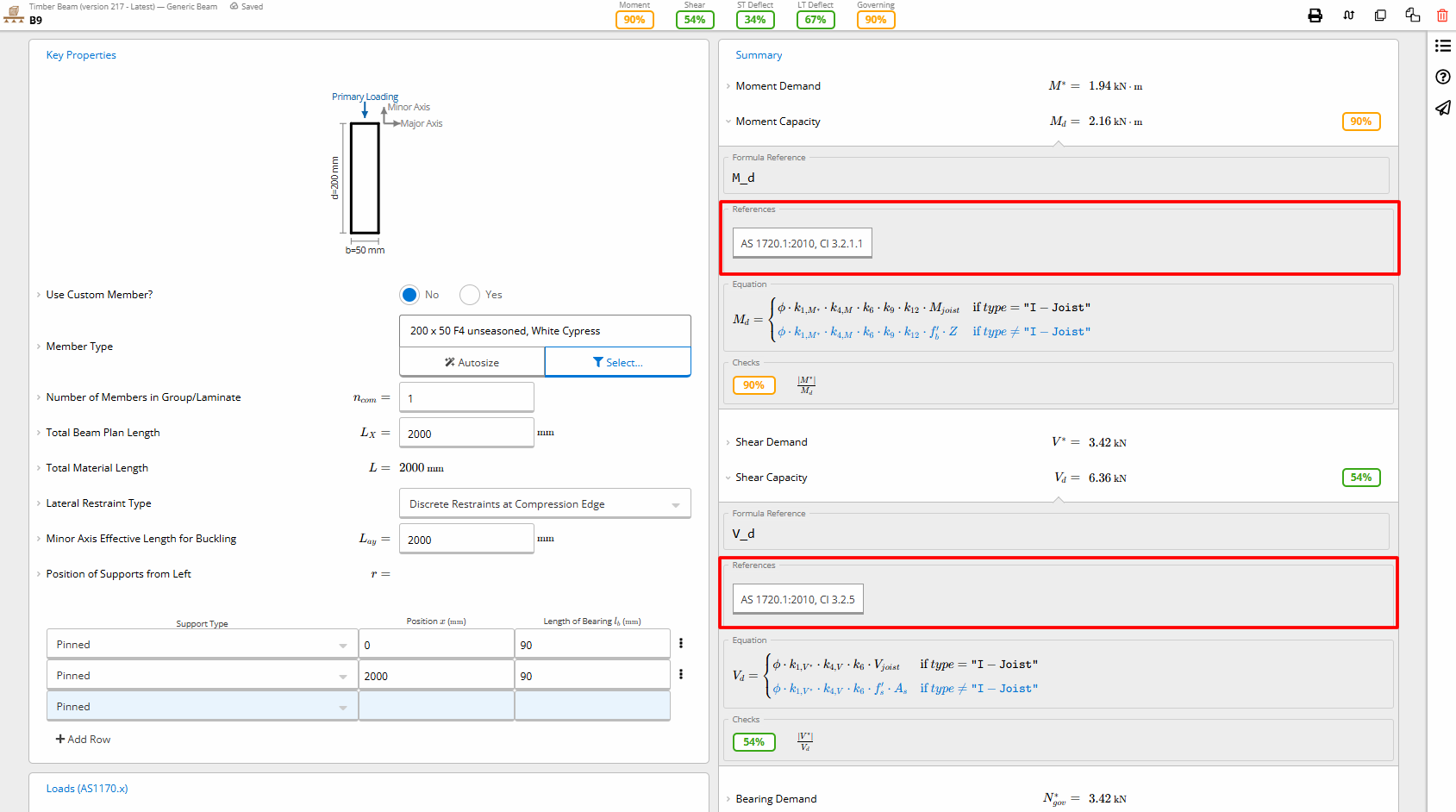
Calcs.com shows clause-level references to AS 1720.1:2010 alongside moment and shear design checks, helping engineers stay code-compliant and clearly document calculations for review or submission.
2. Scalability with project complexity
Spreadsheets may work for simple lintels and decks, but break down fast as load paths, materials, or code references grow in complexity.
The best structural engineering software scales with your project requirements, whether you’re designing a single-story dwelling or a multi-material commercial facility.
- Look for platforms that support load linking, multi-span systems, and integrated member selection, so your workflow scales with your projects.
- Calcs.com, for example, helps ensure every member in a structure carries the correct loads without re-entering data.
3. User-friendliness and learning curve
Software should help you move faster, not slow you down. If it takes weeks to get up to speed, it may not be a good fit for smaller teams or solo engineers.
“It shouldn’t take four days and 50 YouTube videos to model a basic wood frame.” Structural engineer on Eng-Tips
- Prioritize platforms with an intuitive user interface that include tutorials, in-app guidance, and responsive support.
- Calcs.com, SkyCiv, and StruCalc all score well here, with interfaces designed for productivity, not punishment.
As Jim Fanjoy of Brittell Architecture puts it: “Calcs.com has a simple, clean interface that allows you to get to work quickly and clearly shows what is happening in the calculation so you can make smart choices in structural design.”
4. Transparent calculations
“Black box” software outputs make it hard to justify your design decisions to clients, reviewers, or even your future self.
- Choose tools that show formulas, assumptions, and design checks directly alongside visual diagrams.
Tools like Calcs.com also include Reference Mode, which displays relevant code clauses and formulas directly next to your calculation steps. This not only helps you validate results in real time but also builds confidence during peer reviews, client presentations, or certifier submissions.
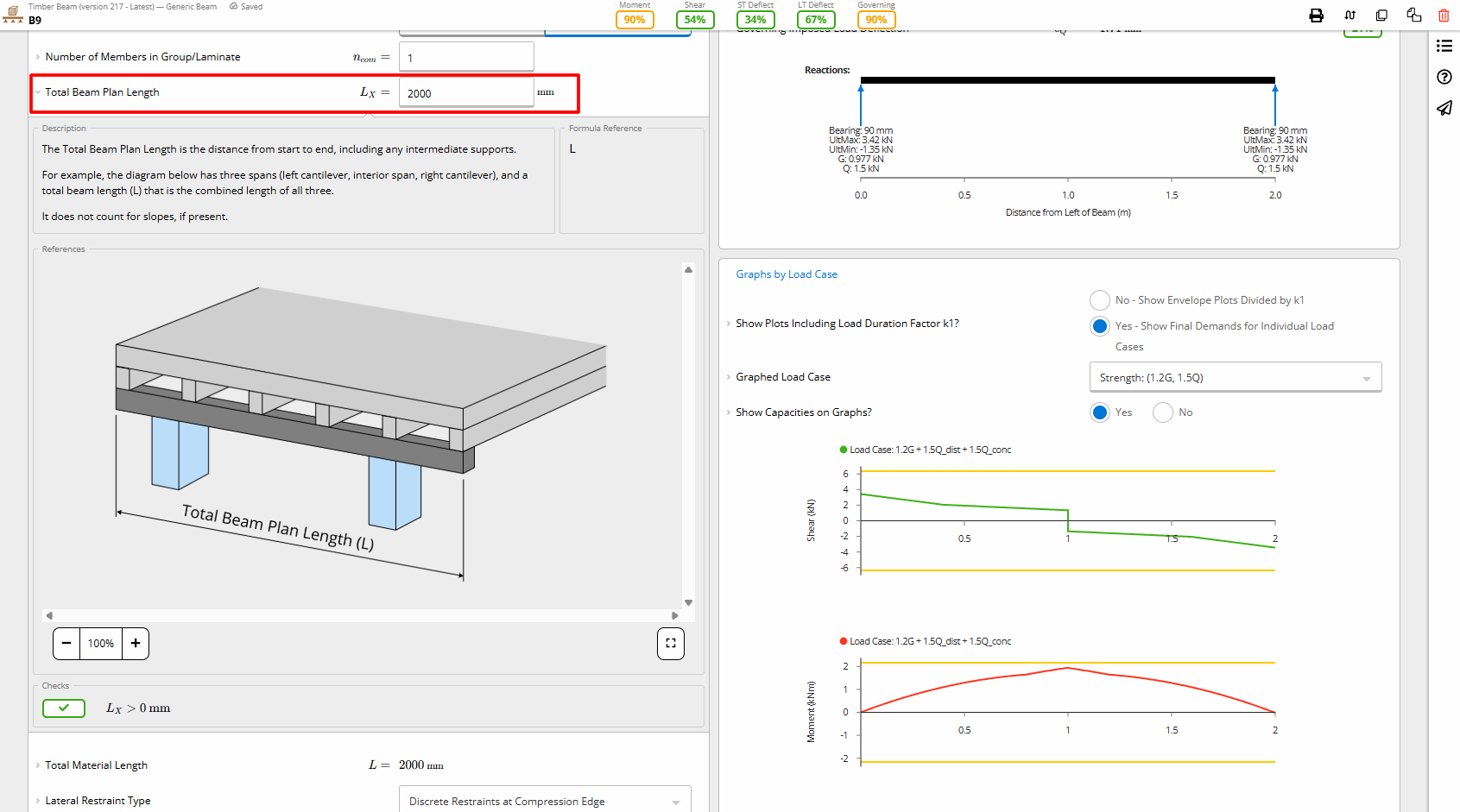
Calcs.com provides full transparency in structural calculations by visually linking input definitions, like beam span length, with real-time shear and moment diagrams.
Calcs.com offers PDF and CSV exports of detailed calculations, helping you retain full traceability so that each parameter and calculation is known.
5. Integration and compatibility
Spreadsheets often require double-handling to create reports, coordinate drawings, or pull in data from CAD/BIM models.
- Modern tools should integrate with PDF print workflows, DWG/DXF import/export, and even architectural layouts from Revit or AutoCAD.
- Calcs.com and SkyCiv provide PDF summary exports and drawing support.
6. Efficiency and productivity
Good software doesn’t just reduce errors, it frees up time. For engineers operating on tight schedules and fixed-fee contracts, efficiency is often the difference between profit and loss.
- Prioritize tools that eliminate redundant inputs and manual work.
- Features like pre-built calculators, built-in material databases from local suppliers, and automated load distribution can significantly cut design time.
- Tools that allow real-time edits, print-ready exports, and cloud-based access help teams move faster with fewer revisions.
Calcs.com includes time-saving tools purpose-built for engineering workflows. For example, the load linking feature automatically carries load reactions from one member to the next, like linking sheets in Excel. So you only input data once, and your updates flow through the structure dynamically.
The member selector helps you instantly compare manufacturer sections, running pass/fail checks in the background so you can make informed decisions without flipping through span tables. Combined with automation features like autosize, these tools help engineers save hours per project and focus on design, not data entry.
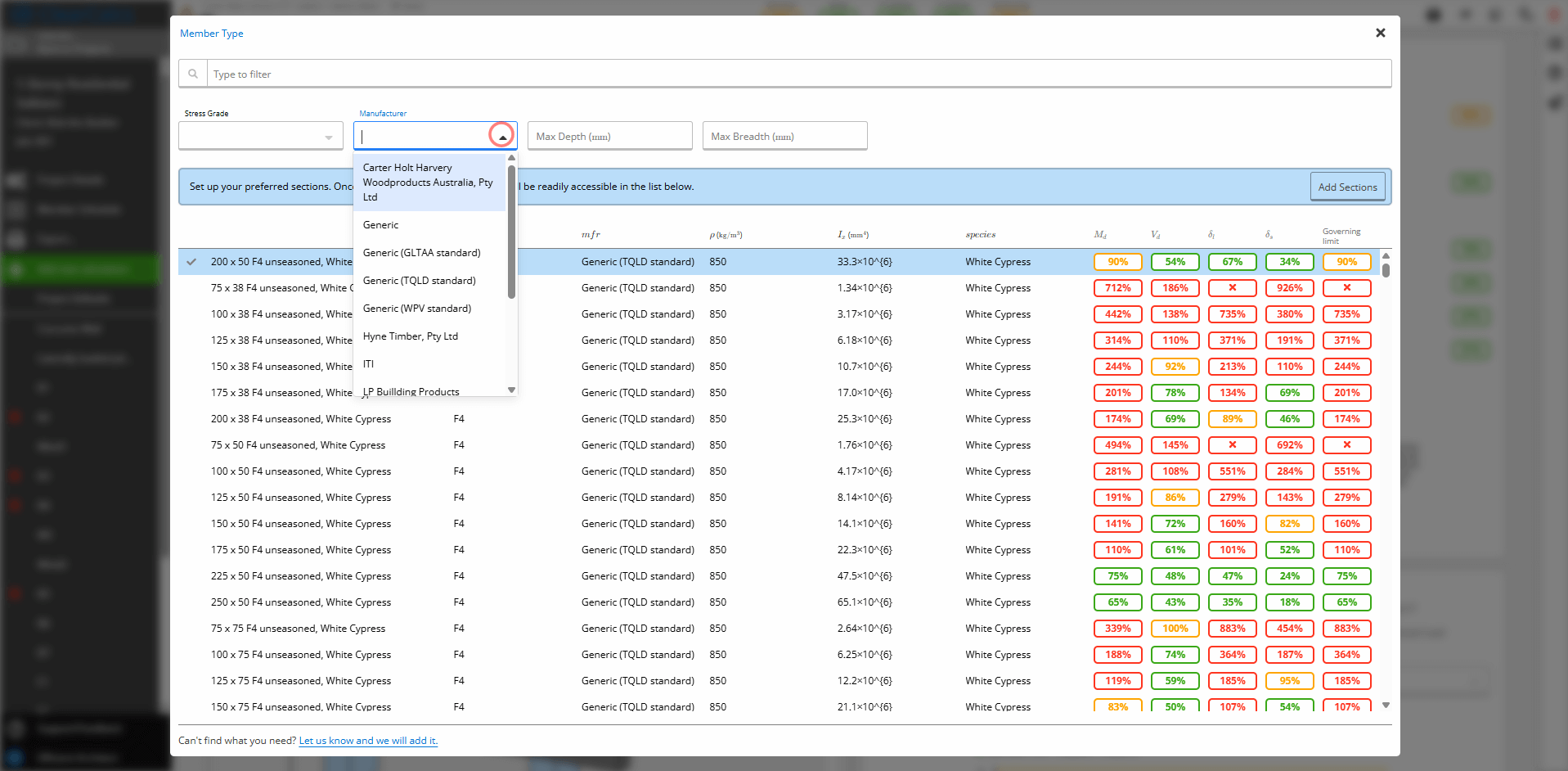
Calcs.com integrates timber and steel member data from leading manufacturers, allowing engineers to select real-world sections without flipping through span tables.
Engineers using Calcs.com consistently report significant time savings, with Lawrence Bowen of VQ Design noting a 75% reduction in workload that enabled him to take on more projects without compromising quality.
Similarly, Donovan Rae from Lumos & Associates shared that the software boosted their team’s productivity by at least 30%, a critical advantage when working within the constraints of fixed-fee projects.
7. Peer support and vendor responsiveness
Working alone in spreadsheets means reinventing the wheel. Strong software communities offer help, share best practices, and speed up problem-solving.
- Look for active user communities, detailed documentation, and responsive customer support.
- Vendors like Calcs.com and SkyCiv provide access to webinars, live chat, blog tutorials, and engineering guides tailored to your local standards.
Workflow compatibility: How well does your structural software fit into daily operations?
The best structural engineering software isn’t just about features, it’s about how well it integrates into your day-to-day workflow. Whether you're preparing submission packages, collaborating with architects, or working on residential jobs with tight turnarounds, file format support and integration with drafting tools like AutoCAD and Revit are essential.
Some tools export clean PDFs or DWGs for drafters. Others create bottlenecks with proprietary formats or limited compatibility, which can lead to double-handling, formatting errors, or frustration in downstream processes.
Use this table to understand which tools align with your projects and which might create friction.
| Software | File Format(s) | Best For | Less Suitable For |
|---|---|---|---|
| Calcs.com | Online, PDF, CSV | Residential/light commercial buildings Timber, steel, concrete member and connection design | High-rise lateral system modelling |
| Structural Toolkit | Native app, PDF export | Wind & timber calcs for residential | Complex multi-storey projects |
| SkyCiv | .SKY, .DWG, .PDF | Light to mid-size commercial/residential | Non-linear analysis |
| SpaceGASS | .SGS, .DXF | Commercial buildings, structural frames | Small quick designs |
| ETABS | .EDB, .DXF, IFC | High-rise seismic, modal analysis | Fast residential calcs |
| Enercalc | .ENX, PDF | Quick US-based code checks | Collaborative teams needing cloud |
| StruCalc | .CAL, PDF | Timber, steel beam design | Full structural packages |
Engineers frequently mention frustration with tools that “don’t play nice” with others, whether that’s a lack of DWG/DXF support, no cloud sync, or poor export formatting. One user summarized it well:
“The software works, but the second I try to export to DWG for my drafter, it’s a mess.”
Calcs.com helps engineering teams bridge the gap between structural calculations and documentation by offering clean PDF and Excel exports, along with an API for custom integrations. While it does not currently support DWG or DXF file imports, its streamlined export options allow engineers to easily incorporate load tables and material data into architectural layouts using tools like AutoCAD or Revit. This makes Calcs.com a strong fit for firms that need fast, reliable handoffs between design and drafting workflows.
Key insights:
- Calcs.com is ideal for engineers working across residential and light commercial projects who need export-ready reports and transparent calcs.
- ETABS and SpaceGASS shine on high-rise or seismic projects but may be overkill for simpler workflows.
- SkyCiv stands out for cloud compatibility and Revit export, which is helpful in design coordination workflows.
This table helps filter options based not just on what the software can do, but how well it fits your everyday workflow.
Frequently asked questions
What is the best structural engineering software?
There is no single best structural engineering software, the right tool depends on your work. For analysis-heavy modeling of large or complex structures, dedicated analysis packages fit well. For everyday member design and code checking with a clear audit trail, a standards-aligned platform like Calcs.com is faster to adopt and easier to review. Compare tools on code coverage, transparency, and how they fit your workflow.
What is the difference between structural analysis software and structural design software?
Structural analysis software calculates forces, moments, and deflections under load. Structural design software checks members against a building code and sizes them. Analysis tells you how the structure behaves, design confirms each member is adequate. Some platforms, including Calcs.com, do both.
Is there free structural engineering software?
Yes. Calcs.com offers free online calculators for common checks like the beam analysis calculator, the moment of inertia calculator, and section properties, with no install. A paid subscription adds the full library, load linking, and documented code checks. Many engineers start with the free tools and upgrade when they need the full workflow.
What structural engineering software works for US codes?
Calcs.com is built to US standards including AISC, ACI, NDS, and ASCE 7, and is updated when the standards change. It also supports AU, CA, NZ, and EU codes, so teams working across regions can stay in one platform.
How do I choose structural design software for a small firm?
For a small firm, weigh how fast you can adopt it, whether it covers the calculations you actually use, and whether you can inspect and defend the logic. A cloud platform with transparent calculations and code references lowers the switching risk because you can verify every result.