A reviewer flags your wind load calculation. The project header says ASCE 7-22. The load combinations underneath do not reference a specific clause. You spend the next hour confirming what was actually applied, line by line, before you can respond to a single comment. The version label told you what edition the software claimed to support. It did not tell you what edition was applied to the calculation you are trying to defend.
That gap between a code version label and actual code compliance is where review cycles stall, and where engineering defensibility breaks down. Most standards-based design tools now market "IBC 2024 support." Fewer make it possible for a reviewer to confirm that claim without reconstructing the work.
A version label answers a different question than a reviewer asks
Software that claims ASCE 7-22 support has typically updated its wind speed maps, seismic parameters, and risk categories. That is enough to print the version on a project header. It is not enough for a reviewer to confirm which load combination governed a specific beam check, or which clause defined the importance factor applied to a specific member.
The distinction matters more in the 2024 code cycle than in previous ones, because the referenced standards are not moving in lockstep. IBC 2024 adopts ASCE 7-22 for loads, AISC 360-22 for steel, and NDS 2024 for wood. It retains ACI 318-19 for concrete. A single calculation that combines a steel beam with a concrete foundation is now pulling from standards published across different cycles. If the output does not name which edition applies at each step, the reviewer cannot verify compliance without going back to the code books.
Mixed editions in a single calculation are normal, and that is the problem
Consider a steel beam supporting a concrete slab. The beam design references AISC 360-22 for member capacity and ASCE 7-22 for load combinations. The slab design references ACI 318-19 for flexural checks. Three standards, misaligned code cycles, in one project.
When the software applies a single version label at the project level, it obscures which edition governed which check. The engineer knows, because they set it up. The reviewer does not, because the output does not show it. That turns peer review into reconstruction rather than evaluation.
This is not a question of whether the software calculated correctly. It is a question of whether anyone other than the original engineer can verify that it did.
When you open a calculation, ask five questions before you trust it
The next time you open a calculation output from any standards-based design tool, check whether you can answer these without leaving the document:
- Which edition of each referenced standard was applied? Not just the project header. The specific edition at the check level.
- Which clause or table governs each check? A load combination result without a clause reference is a number without a source.
- Is the formula shown as written in the standard, before substitution? If the output only shows the computed result, you cannot verify the method.
- Where did each input come from? Was it entered manually, linked from another calculation, or pulled from a standard's table?
- What changed between the previous code edition and this one? If the tool updated from ASCE 7-16 to ASCE 7-22, can you see which provisions changed in your specific calculation?
If any of these are missing, the engineer who built the calculation is the only person who can defend it. That is a fragile position for any project that requires peer review, plan check, or a second set of eyes.
Calcs.com splits calculators by code edition so the logic matches the label
Calcs.com handles the code version problem differently from most standards-based design tools. Rather than applying a version label to a single calculator template, Calcs.com maintains separate calculators for each code edition. There is a distinct calculator for ASCE 7-22 and a distinct calculator for ASCE 7-16. Each one implements the load combinations, maps, factors, and provisions specific to that edition.
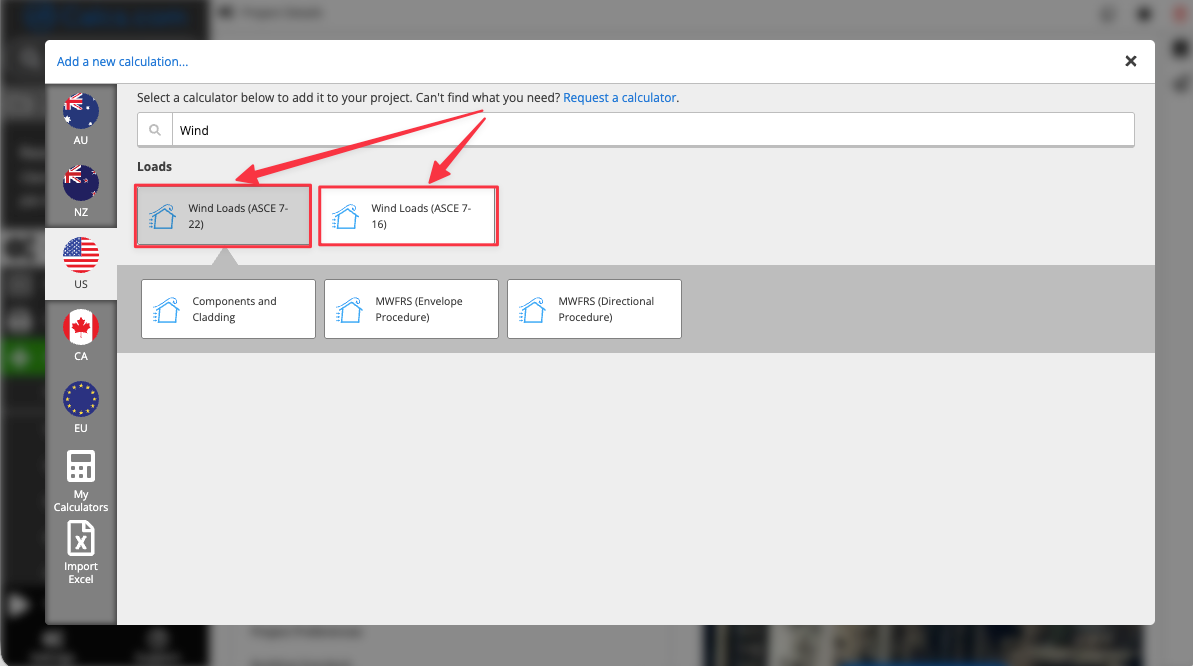
This matters because it forces the underlying logic to match the label. When a calculator says AISC 360-22, the capacity checks, width-to-thickness limits, and stability provisions reflect that edition specifically, not a previous edition with an updated header. Every formula appears in the output as written in the standard, with the clause reference visible. Every input is traceable. A reviewer can evaluate the engineering judgment rather than spending their time confirming what code was actually used.
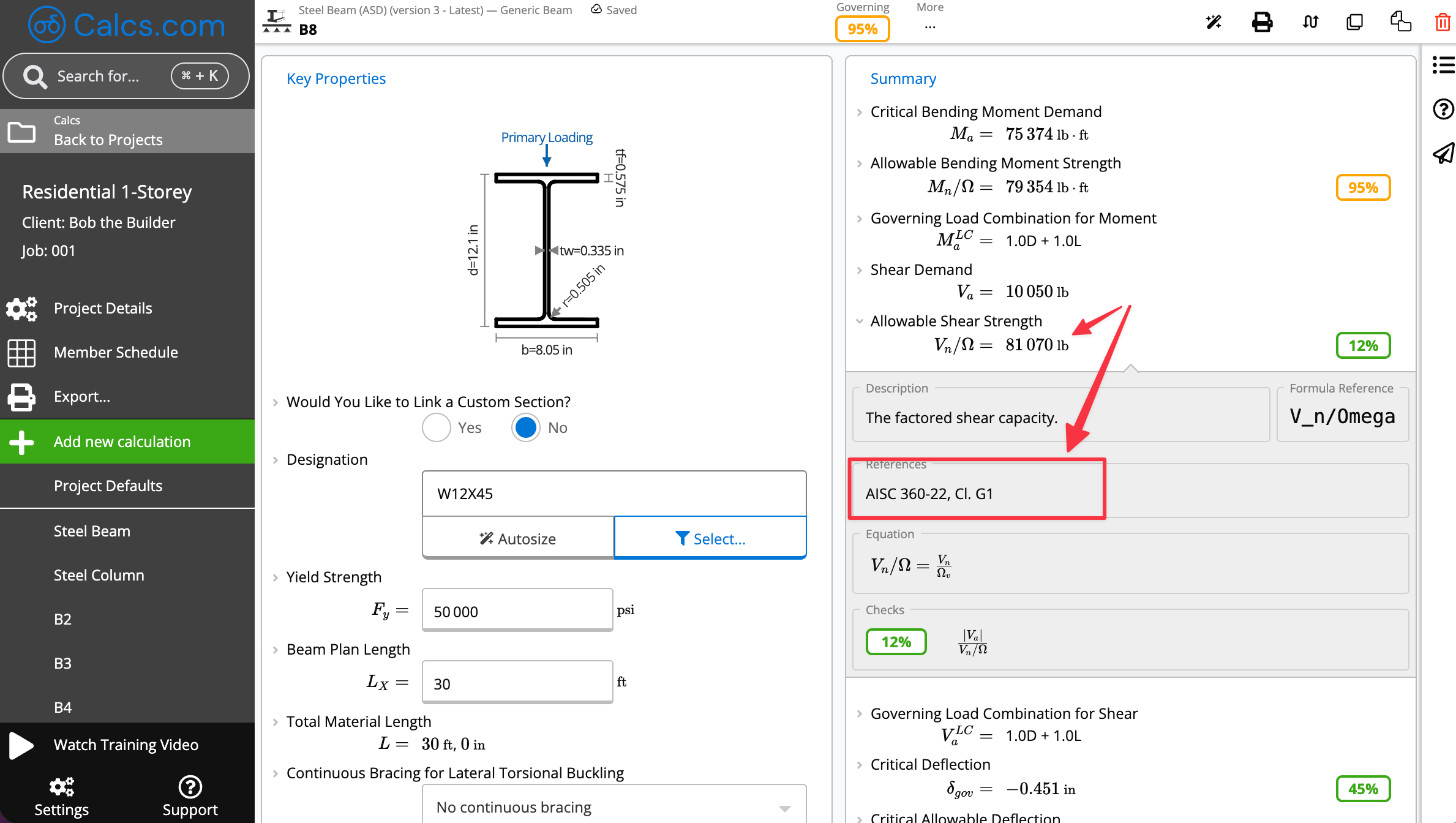
The structural report also names the standard edition at each check, not just at the project level. When a steel design pulls from AISC 360-22 and loads pull from ASCE 7-22, both references appear where they are applied.
The version label is a starting point, not evidence
The 2024 code cycle is the first in which most jurisdictions will adopt IBC 2024, ASCE 7-22, and a mixed set of material standards simultaneously. Engineers working across project types will encounter calculations where two or three editions intersect in a single member check. The tools that treat code compliance as a label will keep creating the same review problem. The tools that treat it as visible, clause-level traceability will not.
The difference between the two is whether your reviewer can confirm your work, or has to redo it.
Calcs.com is a standards-aligned calculation platform used by structural engineers across the United States. Built to IBC, ASCE 7, AISC, ACI, and NDS standards. Updated when standards change.
Hand your reviewer a calculation, not a reconstruction job
The gap between a version label and code compliance is usually a traceability problem, not an engineering one. Calcs.com shows the standard edition, clause reference, and applied formula at every check, so a reviewer can evaluate the work without reconstructing it.
Put your calculations in an environment that holds up under review
Calcs.com shows the standard edition, clause reference, and applied formula at every check, so a reviewer can evaluate the work without reconstructing it.
Start a 14-day free trial